This conversation has reminded me that Maximus exists and I should probably be using it more.
2 Likes
Oh yeah, I totally forgot about FL 25 - I unfortunately have to use the cracked version so I cant update. Guess I might need to save for a licensed copy instead of a new iPad. After all, music is life 
1 Like
Weirdly enough, the demo is almost better in a lot of scenarios. The only real downside is not being able to work on tracks again, but the fact that you can theoretically keep it open for as long as it takes to write and export a full track is pretty damn incredible. You can even bounce all of the stems and MIDI out for reconstruction later, kind of like a makeshift save state 
In fact, I was just playing with newtone even though I technically don’t have the upgrade yet. FL doesn’t even stop me from just exporting whatever I make with it, it just doesn’t want the newtone session saved back into a project file. I’ve never met a DAW so generous in my life 
Also, this shit. Most companies are bastards about your rights as a designer, but here we have:
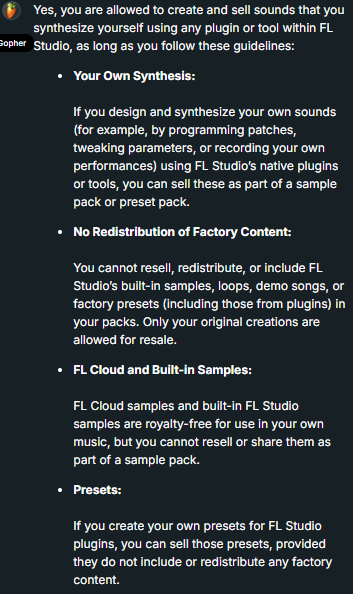
A lot of them don’t even like when you sell preset packs (I do it anyway, they can fuck off), but FL has the most generous policy I’ve ever seen right out in the open. I know they’ll fight to the death if you cross a line, but they really seem to care about users in a way that not many companies do
1 Like
I know, right? When I first got the demo I was having so much fun making little tunes before closing the program, the only real problem with exporting stems was how much control over them I lost without any knobs to tweak.
I don’t mind sticking with 21 for now, but you bet as soon as I have the money I’m buying the fuck outta FL studio. Would consider Ableton but to be honest for the price difference and genres I make I think good old FL Chan is going to be my best friend for a long time. Livecoding you say? It’s called being a disk jockey.
Actually, they should technically be called USBJs, or WAVJs when you think about it…
1 Like
If you ever need anything high-powered later on, Bitwig goes on sale for less than half of what Ableton costs and makes Live look like a clunky dinosaur in the process. Losing Max / MSP but getting Poly Grid and a much better DAW instead for so much cheaper is a real win, especially since most people don’t go that deep anyway (and there are better environments anyway).
Honestly, I don’t know how Ableton is still in business. Even Max standalone is another ~$600 if you want all the features.
It’s a fair question, at least on the surface. FL is a much better value proposition just based on the amount of shit in it. Though you could also ask why Image-Line is still in business when Reaper is a thing, solely based on cost. Hell, people still pay the Mac Tax and use Logic. Horses for courses.
To be fair, I haven’t seriously used FL since it was called Fruity Loops, but I do check in and make a track every once and a while, check out new features, etc. It’s certainly improved by leaps and bounds in certain areas and continues to do so.
Two big sticking points with me. First, it’s a mess as far as workflow, at least how I use a DAW, and that’s not likely to change given it’s a (legitimate) design decision by Image-Line. Ableton is opinionated in its layout and workflow and thus incredibly streamlined, whereas FL is a shitshow of options and flying windows (windows probably being my biggest moment-to-moment frustration with working in FL) that gives you many routes to the same outcome at the expense of complexity and time. Most of my complexity is front loaded into things external or tangential to the DAW; I just need somewhere for my audio and midi to live while I do things to it, so all the “in-the-box” complexity of FL is just meaningless overhead and frustration for me. There is no way for me to work faster in FL than in Ableton simply based on the fundamental design ergonomics, and given how I prefer to work that’s not a tradeoff I’m willing to make.
Second, M4L/Max integration has no peer in another DAW. Until Patcher or Polygrid or whatever gives me direct access to things like FFTs, we’re not even talking about the same kind of tools. I totally recognize that the majority of users never get that deep into it and just use things other people made, but for someone that wants to build from scratch, FL and Bitwig and all the others are severely limited options that don’t expose anywhere near the same power and workflow.
As a corollary, access to all the free M4L stuff released over the years completely nukes any plugin suite from any DAW. It’s batshit crazy the breath and depth of available options. The cost is obviously Ableton + your time to go find things you like and sift through the junk. Not really a reason to pick Ableton, but it’s a nice bonus if you’re already there.
I’m not trying to shit on FL - it’s a completely valid choice, maybe the better choice from a cost standpoint or for a more ‘standard’ EDM-style workflow, but I think it’s fair to explain why someone might pony up the money for Ableton and that FL is in no way a magic bullet depending on what you’re trying to do and how you prefer to work.
I’m glad that there are completely different directions for popular DAWs. Remember that Pro Tools totally dominated the market for 20+ years with their draconian licensing and horribly outdated interface based entirely on momentum from the old days when people got in the same room and recorded acoustic instruments. I don’t think Ableton is resting on its laurels in the same way, but what we’re talking about is 100% why competition is a good thing - new features, new ideas, and feature parity. Innovate in a direction or get slowly swept out with the tide.
2 Likes
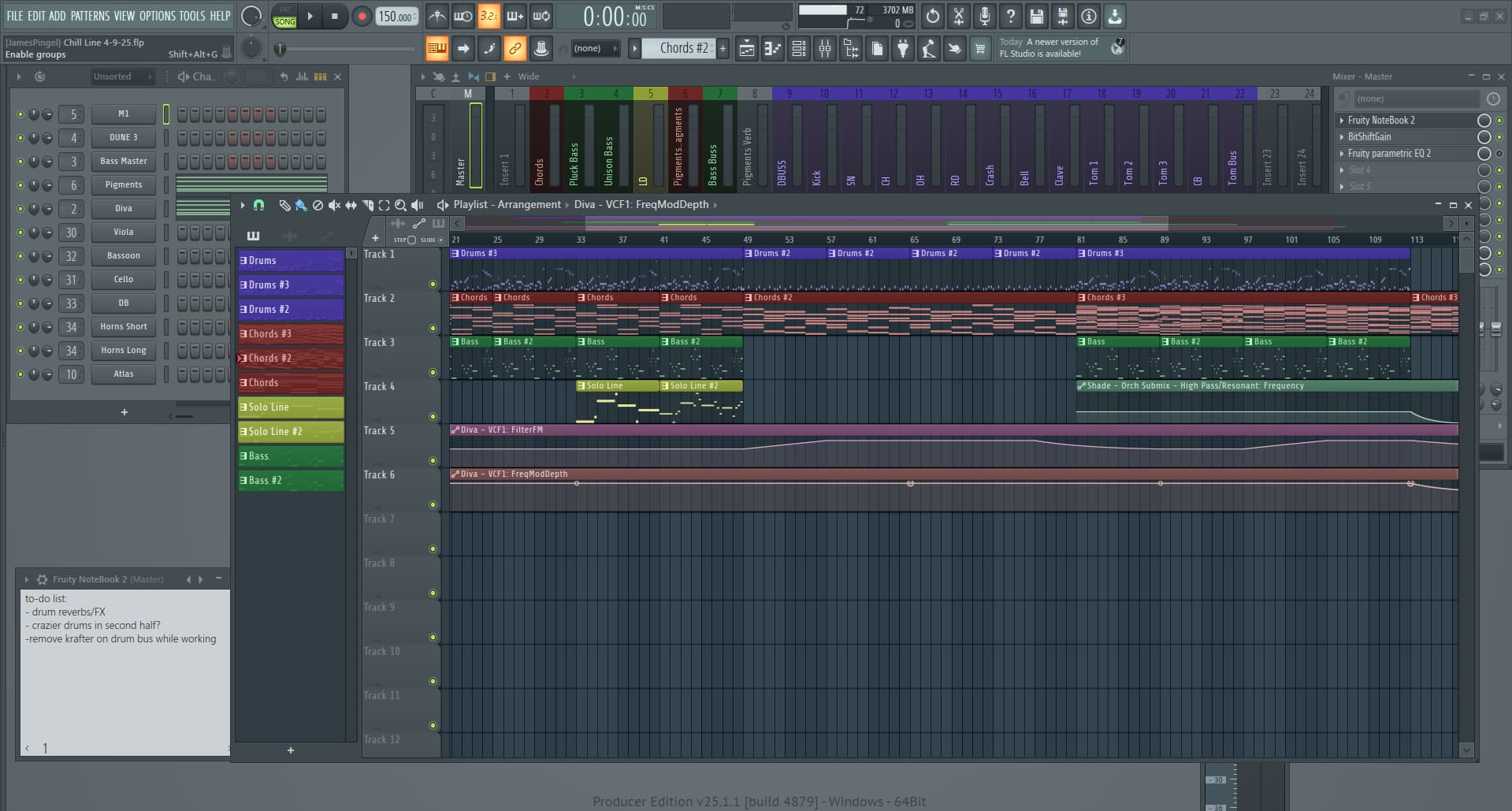
I totally get the UI not working for other people. This is what it looks like when I load a project, and I totally get that this is an overwhelming mess for people. I just like to see everything at once, and quickly mouse into the mixer window if I need it, or to the pattern window if that’s where I need to be, and to always be able to see my arrangement. The fact that I can’t do that in other daws is what has kept me from switching. But I will grant that this is information overload for most people, and even if I wasn’t using a bunch of paid plugins most people probably are going to struggle to wrap their heads around this if I sent them this project file because I have mixer tracks bussed into all sorts of places (I just use normal mixer channels as sends and subs) and like 5 instances of orchestra libraries doing all sorts of crap musically.
The only way I can keep track of it is to look it all, all the time. I cannot keep all this information in my head in something like ableton.
On the flip side, I was watching Anthony Maronelli with Hainbach yesterday. They walk into Hainbach’s studio and he can flip 2 switches and say “this will be on channels 1,2 and 5,6 - you have ableton right?”. Anthony Maranelli says yeah, Hainbach says “cool I’ll send you the project so you have the audio for your video”. And that just works. It syncs, it sounds good, it mixes with the camera audio just fine. And I watched it take 30 seconds to set up in a very complex studio environment. I’ve recorded some hardware with FL an it’s never been that streamlined, and again I don’t know if anyone else can open up a project of mine and orient themselves. In Ableton, you have the network effect of being able to work with anyone else who uses Ableton as long as you stick to their pretty much industry standard stock plugins. That would be the appeal of Ableton for me.
1 Like
I get you. I’ve forced myself into habits like always putting my phone in my right pocket and wallet in the left, or putting my glasses in the same place on my nightstand, because I’m fucking useless when I don’t do stuff like that. My brain just doesn’t keep up with the world without some reliable organization behind it.
The tradeoff in Ableton is everything you’re talking about is a single click, or better yet a hotkey, away. With muscle memory (which I’ll admit is a slog to develop), I can context swap as fast as my eyes can track while keeping exactly what I want on the screen with keystrokes instead of grabbing the mouse.
Outside music production and some domain-specific stuff for work, I live in Linux land and exclusively use tiling window managers which follow the same principle - as long as you keep things organized everything’s one hot key away, and your brain stops thinking and just does. I think my familiarity with that sort of system makes the Ableton workflow of fast context switching easier to digest.
I swear that’s not me evangelizing for Ableton - I totally get that its workflow is as foreign to a lot of people as FL’s is to me. I guess it’s just interesting to highlight the differences in approach and the ways different DAWs solve the problem.
Holy crap that was a fun watch. I honestly didn’t even pick up on the Ableton stuff, but watching someone like Anthony go “wow, what’s that?” was neat. Hainbach’s level of experimentation and understanding of his tools never ceases to amaze me.
These are all great points. I guess even things like Reaktor / Plugdata don’t integrate directly, so maybe for a lot of people, this is the best option out there to date. I feel like there are workarounds galore for this, but I also know the frustration of trying to get a whole chain of saved files to open at the same time in various environments without having to manually fetch for them all over again, so the smoothness might really be worth the investment over all
1 Like
I can’t wait until they (if they ever do) feature some kind of anti-decoupling mode where you can have certain playlist tracks (if not every one of them) never forget their mixer lane, similar to how pretty much every other DAW works. That would resolve 99% of my FL headache right there.
They have a soft version of this but it gets messed up any time you move things around
I know there’s a mixing/tracking mode that kind of does this. I use it for the rare occasions I’m asked to do a mix or a stem master. Absolute life saver when you can just number the stems and then drop them in and FL automatically orders and routes them. Then I just have a set up a few submixes and sends.
1 Like
That’s a lot of words and I ain’t reading them all, but from what I’ve skimmed over I saw a lot of layout differences and workflow being talked about. I think that both FL and Ableton are very heavily biased towards their more suited operating system. FL is very windows based, and Ableton is very Mac based. If you’re a windows enjoyed, FL will feel a lot more native to you, and vice versa for Ableton. I’ve used both and aside from being confused trying to find stock plugin counterparts I feel like Ableton is a lot nicer to build with… FL is just more familiar to me.
Ableton is GREAT for bass music, but due to its great major stock plugins and not little simple ones, it’s worse for things like hard dance and breakcore. To put it simpler, FL is a great all rounder, but Ableton is the conventional genres workhorse. (Yes wayne, we know you make slapping IDM in Ableton)
I want to use Ableton in the future because of the workflow and acoustic/electronic pawahhs, but FL will always be my secret lover affair.
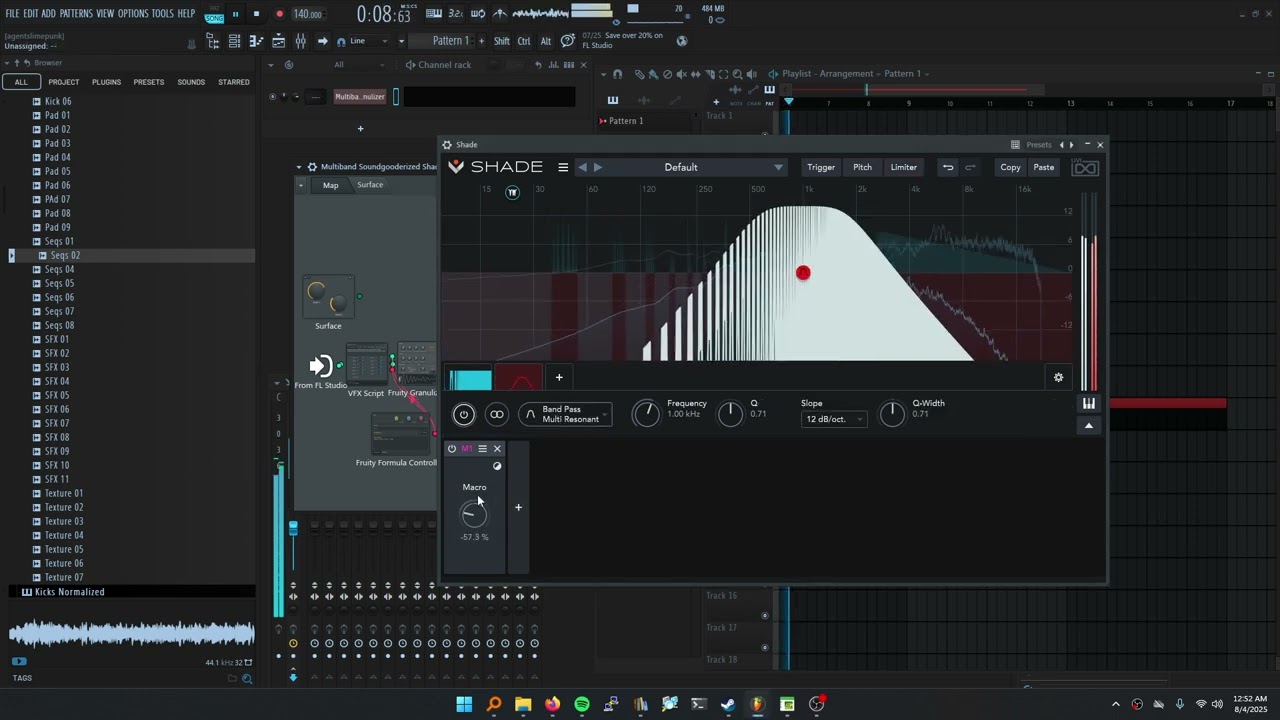
This is mostly how I use Patcher (although I just picked up Shade so I’ve been fucking with the phasers and flangers nonstop for a while now) but I think there’s a lot to be said for having a lightweight pedalboard of sorts. Doing this type of shit in any other DAW always feels like I need to keep track of what’s going on mentally when I need a constant visual representation.
You can obviously do this type of stuff in VCV / VM with a visual component to it, but Patcher is super optimized like most DAWs and as much as I love modular, hosting plugins always grinds shit to a halt. Patcher’s just kind of brilliant for what it does.
I also like prototyping plugins this way for easy connecting / disconnecting when shit flies off the rails
1 Like

(Random color blaster)

(Turing machine sequencer-thing)
I’ve been having way too much fun with this shit. If anyone wants to demo some scripts or have something made, this is my new jam lately. And what a way for newcomers to dive into Patcher
2 Likes
Dude, you’ve really gone off the deep end with this stuff in the best of ways. It’s really impressive how far you’ve come with audio tooling and design. I have two questions:
WTF is that Turing sequencer and how does it work?
As a non-FL person, is there some clearing house of this kind of stuff where you can upload…whatever these are (scripts? programs?) and get them in the hands of people? I really think a lot of your ideas would have legs with a broader audience.
2 Likes
I’m taking a few liberties here (as it’s not self-modifying (until I find a way in!)), but the knobs start off randomly-generated, the user can pencil in any number of steps they want if they open up the script and immediately have that many steps in their sequencer. And of course they can manually recalibrate it with the knobs after the fact.
It’s also not running on FL’s weird pseudo-MIDI handling engine (they still have some work to do in this department, IMO), and instead just acts like any old CC controller so you can easily use it with plugins or whatever else. That’s kind of my favorite feature of their new VFX Script.
As far as I can tell, not really. I’ve been uploading them to Itch.io and letting people swarm and test things out, but even the official FL forum is kind of dead. Patcher (FL’s very basic pseudo-modular environment where a lot of these tools exist) still seems to confuse pretty much every FL Studio user I’ve talked to, so even trying to get people into the shallow end so they can even test-drive some of these tools is difficult.
Most FL studio users don’t even understand the color system (which I built that randomizer above for), so I guess it’s all a hard sell. I think the discrepancy comes from FL Studio mostly being a toy / drum machine on the surface and then having some truly bizarre and awesome systems underneath. The “no need to RTFM” philosophy doesn’t seem to jive with actually checking out an API (or multiple, as those are equally haphazard and nonuniform), so I guess it’s just my own little pigeonhole for now.
Also, a lot of would-be Patcher users seem to think they need to know modular synthesis techniques in order to use it, but it’s more like legos - no VCAs, no modulators (unless you want them), just easy routing and piping shit to cool places. But very extendable with anything eurorack-like!
2 Likes
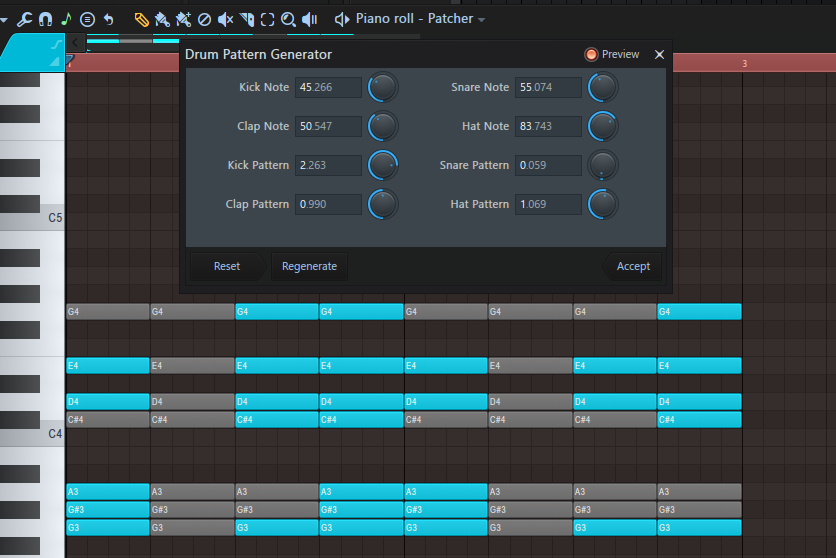
Another weird thing I found out is that if you make a piano roll script, you can actually run it over and over again in the same session. I didn’t realize that it wouldn’t nuke everything out (unless that’s part of your script), so you can layer the fuck out of things without having to expand it 20x over.
1 Like
I’m still confused about what it actually does (and pardon my ignorance, this is probably me not being familiar with FL and being generally thick headed) - is it controlling whether steps fire, or whether there are steps at all, or are the params tied to something else entirely? What happens if you change a knob? Are there rules like in an actual Turing machine where it changes state depending on the input? It sounds like under the hood it’s just sending MIDI CC, so I suppose it could be generalized to control anything that accepts a MIDI message?
That’s a bummer they don’t push something that powerful to the forefront. It seems like ripe territory to draw users in and let the geekier user element (which may just be you right now lol) provide tools for people that just want to rip sick beats, yo.
To draw a potentially unfair comparison, Ableton really sells their M4L integration as “there’s a whole ecosystem you’re probably too dumb to use, but that’s cool because smarter people package these things and you can use them like a native plugin’“ and then provide an ecosystem to distribute them, and it’s worked well for them. I’m surprised Image Line hasn’t done the same, if only to say it has some feature parity with a big competitor.
How hard is it to get one of these things running as a know-nothing user? Can you just dump it in a folder and start twiddling or is there setup you have to do to even play with it?
1 Like
Not yet (this is a good idea, though!), but it can be reinitialized at the push of a button. So I guess you could see it as a loopable pattern generator, similar to the turing machine modules, but without modifiable loop points. Although now I’m getting ideas on how to make it even better, thanks to you!
FL sort of has its own interpretations of MIDI and control signals internally (only being 3 in total), but this one pretty much is just a CC loopback, or like any DAW’s macro controller, so you can pretty much use it for anything. Internally, these are just red ‘control’ signals, and tools like the VFX script can generate those, as well as the green ones that closely mimic real-life MIDI notes, but seem to have a few limitations internally.
Yeah, weirdly I only got into FL about a year ago (I think?) so I didn’t realize that a lot of these tools were created very recently. Apparently prior to 2023, even piano roll scripting didn’t exist, so for me it just feels native and comfortable being able to write Python anywhere I want, but apparently these are fairly-new constructs in general. That gives me hope that there might be a budding community, somewhere, at least. Or at least a handful of people requesting awesome features.
What’s strange about FL is that, apparently years ago, they had some kind of microcontroller / robotics integration software in the midst of all of this that mysteriously became discontinued in 2021 (before I even knew about any of this), with some tagline about, “Now FL Studio can brew you a pot of coffee!”. I really wish they’d push for something like that again, or enhance some of these devices to actually rival Max, but that might take more interest on this side of things. They seem willing to toy with it a little bit, so that gets my hopes up at least!
IMO, not at all. I’m still a newbie when it comes to FL Studio in general (although I don’t know how much deeper it goes – I haven’t delved into the controller scripting API yet, and I can only imagine hooking it up to Sonic Pi would be like crack for me), but provided you put scripts into their designated folders, getting up and running is blisteringly fast. Patcher is really as simple as just plugging instruments into FX, but bringing tools like Reaktor, PlugData, Cardinal or VM along can really make things even more fun!
Plus, Patcher can pretty much bypass FL’s borderline-retarded mixer, and FL Studio can be VST-hosted (my favorite way of using it), so you don’t really have to mess with the surface-level bullshit at all that gets in the way of actually doing stuff
2 Likes
Ah ha! Now I get it. I was indeed being dense. I wasn’t familiar with Turing Machine eurorack modules and was thinking it was an actual Turing Machine implementation instead of a marketing thing. After reading up on that style of module it makes a lot more sense. That sounds like a super handy rando-generator, especially since you’ve given it a ton of controls. Seems like there’s a bunch of ways you could extend and expand this and you’re already on it!
Yeah, it sounds like IL is really putting in the time to expand the capabilities, which is definitely cool. Honestly given the pervasiveness of coding these days, it’s a bit weird that it’s taken so long for DAWs to incorporate it. To my knowledge, Reaper was the first and supports both Python an Lua. I think Bitwig has some hardware controller scripting similar to FL Studio but mostly relies on The Grid to do things similar to Patcher, which makes sense given its scope.
I guess none of this is easy or done lightly. Takes a lot of work to get going and you have to make sure you’re not breaking things. Kudos to IL for doing any of it.
It’s probably beyond them as a company given their obligations to the larger user base that doesn’t really care. It was certainly beyond Ableton to the point where they had to partner with and then just buy Cycling, because it’s a code base with decades of development and refinement independent of Live. I guess FL could just integrate PD or something, but given you can Patcher PlugData I suppose there’s not much point.
I guess I’m wondering the lift on the part of the user that has just pirated their first copy of FL and can barely use the piano roll, like what’s the setup after they’ve grabbed one of your scripts? Do you drop it in the folder and then it shows up as an option for Patcher? Ease-of-use would be a big concern for these kinds of things from a development standpoint, assuming you’re trying to get people to use it. It’s really where Live shines, in that you literally never have to look at or configure the Max back end, you just open the M4L file from Live and treat it like you would any other native plugin. The easier FL makes it the more likely people are to experiment and try out what other people make.
1 Like