The DSP Livecode / Prototyping Thread

I think it’s Fiddle - it says it right up top! :laughing:

https://cannerycoders.com/docs/fiddle/index.html
Apparently it’s a visual coding environment for ChucK where you can stitch together things like in Pd but then write new blocks in ChucK.

Yeah, that sounds pretty damn cool.

1 Like

How’re things going with ChucK? Did you dive into it at all?

ChucK’s on my ‘lets poke at it a bit’ roadmap, but pretty far down. I’m still picking away at that Max patch for sample/buffer mangling and going to really spend some time in SC after that. I’ve been waylaid by a slew of end-of-year projects at work and a cascade of home repairs (heat went out just as it got cold, of course!) so I’ve spent more time thinking about the problem than actually getting to work on it.

What’s been interesting is the total spaghetti mess in Max to recreate your couple lines of code in SonicPi. It’s not really a knock on Max - liveloop and sample in SP have a ton of built in functionality behind the scenes that I’m having to stitch together from basic functions in Max.

A couple of cool things that’s done is one, exposed a bunch of basic variables like start and end/loop points, tempo, offsets and other things that since they’re part of the building process can be manipulated, either through user input (ie tied to a knob) or automated/randomized in interesting ways.

The other maybe bigger thing is that I’m just thinking about things differently. Max and Pd have so many different ways to do the same thing (create tempo, play a sample, generate a random number, etc) that just implementing a process brings up ideas about 'well if I use this function I can also do this thing, but then I have to change this stuff but it lets me use this other function…" which is really neat as long as you can keep the scope creep down. I guess it’s similar to having different hardware or VSTs; one isn’t necessarily better than another but they’re different enough that it makes you approach things differently.

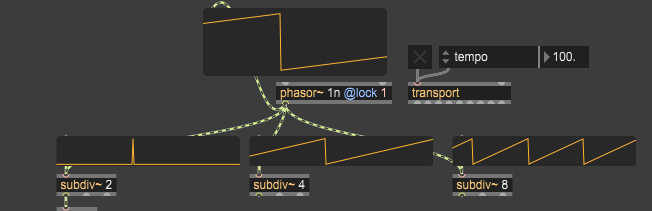
One very cool example is Max/Pd has the idea of using phasors for tempo. You have a basic ramp from 0 to 1 that repeats, and then you trigger events at certain points, like when then phasor resets or when it crosses the half-way point, etc. You can also use built-in subdivisions to generate secondary “pulses” so you don’t have to do any math:


and those subdivs are automatable as parameters as well. What’s really neat here is that those phasors don’t have to be linear, they can be all sorts of shapes that lead to swing or ramping up very slowly then speeding up and everything in between. That might be cool if you’re cutting up beats. What I’ve got above is basically analogous to your 0.5/0.25/0.125 sleep in Sonic PI, though I’m not using the phasor as of yet (and may not at all depending on how things shake out)

Anyway, hacking away as I have time. The holidays will either be a bunch of free time or none at all, so no telling what I’ll get done.

1 Like

I have nothing to add.

Just want to say this thread is a bunch of fuck yeah

In other words the awesomest thread on idmf.

1 Like

Dealing with the same here - I swear, that type of shit always has to happen at the worst possible time :joy:

I sort of abandoned it for a little while, came back to it today and I’m struggling to find a workflow. I love the ease of sending a whole array of oscillators through a whole array of filters and effects with very minimial effort, but I feel like some parts of the puzzle are missing. For one thing, the built-in FX aren’t nearly as robust as something like Pedalboard (Spotify’s Python FX library), so things like flangers and phasers are missing from the start. Of course, they’ve got inbuilt FFT / IFFT, so making your own is definitely possible, but it doesn’t feel like you can start from the top with all of the objects on hand before jumping into the deep end. Getting it into the DAW with VAC and trying to avoid clicks and pops also seems to be an issue.

I really wish there were an environment like this with more of the FX on board, easy DAW connectivity and things like that. I’m probably describing Max again, but maybe this weird little Fiddle thing could be a decent middleman, especially if they have at least a few more effects to pull from and a way to continue writing ChucK scripts. Time to go from one manual to the other :smiley:

This still sounds like such a dream machine; being able to mix and match like that seems like the best of both worlds, even if it’s sometimes overwhelming. Part of me just wants to see how far I can go with the demo, because at least the initial patches are usually nothing worth saving anyway. If I found a way to at least export from there (my guess is that it’s not limited in that way, but I don’t know yet) then maybe it would give me just enough incentive to start patching and coding with it.

I think you’re well on your way to prototyping something even better than what Sonic Pi has to offer; as much as I love SP and Orca, the lack of depth and real control under the hood is pretty much what leads us elsewhere, I think. Even ChucK just feels like more of the same (admittedly with some real DSP interspersed for a change) but this just makes me want to get into Max even more. Every road leads back to it so far, so I really might try seeing what that demo has to offer.

I can’t wait to see how far you get with this!

You could get in on this too, if you ever want to!

I’m always down for writing a simple ‘starter’ script for anyone who wants a sort of springboard to play with who might not be familiar with things like Orca, Sonic Pi, and the like. I imagine it would still be fun to run something, change some numbers, sample it, etc

1 Like

On second thought, I just discovered the Pure Data ‘clone’ object which might actually bridge the gap. I didn’t even know you could reuse and iterate over subpatches until now, so I might have to try that out before succumbing to paidware and demo limitations. But it’s definitely the next stop if all else fails

I also managed to find this, which, if it works, is a serious win for continuing the FOSS journey

1 Like

I do wonder how changing hexadecimal values and databending can add to creating scripts that make glitchy sounds…

If things were different, I would probably be contributing to this thread. But life stuff…so…

Anyways keep at it.

Your hard work and efforts will yield results and open doors.

Who knows…maybe you’ll design your own daw one day or something.:grin:

1 Like

I agree, that QoL is huge. I don’t mind a little friction with this stuff but having to think about how to get sound into a DAW and wondering if it’ll break and not being able to load VSTs is a bummer. I’m not above rolling my own effect (both Max and Pd have built in delay objects so phase effects like flangers are dead easy) but I’ve got a whole suite of awesome plugins (lookin’ at you, Kilohearts) that I like and am used to and not having access to would kinda suck. Having to stop what you’re doing and go “well, I guess I’ll make a flanger” feels like a disruptive side quest sometimes. Like I know in theory how a shimmer reverb works but I doubt I can whip up something off the cuff as good as Valhalla Shimmer or Eventide Black Hole, and I shouldn’t have to when they’re already installed on my machine.

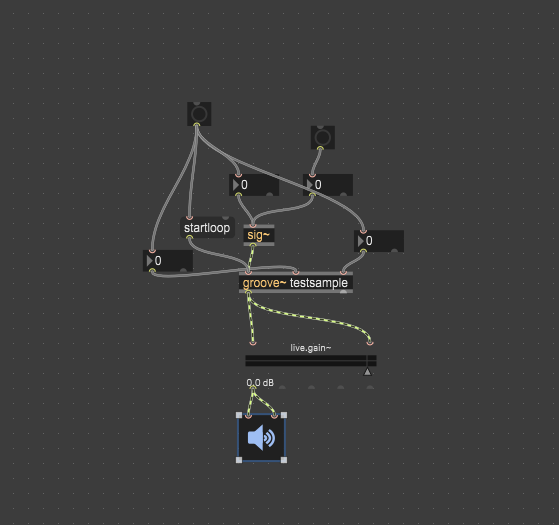
I thought about that specifically for your situation. Max is fucking baller in that department - you can select stuff in your patch and ctrl-c it. It then pastes like this:

Max ctrl-c patch

{
“boxes” : [ {
“box” : {
“maxclass” : “number”,
“patching_rect” : [ 1135.947748303413391, 577.124201238155365, 50.0, 22.0 ],
“id” : “obj-118”,
“numoutlets” : 2,
“parameter_enable” : 0,
“outlettype” : [ “”, “bang” ],
“numinlets” : 1
}

	}

, {
“box” : {
“maxclass” : “number”,
“patching_rect” : [ 1011.111143052577972, 520.915049135684967, 50.0, 22.0 ],
“id” : “obj-117”,
“numoutlets” : 2,
“parameter_enable” : 0,
“outlettype” : [ “”, “bang” ],
“numinlets” : 1
}

	}

, {
“box” : {
“maxclass” : “number”,
“patching_rect” : [ 924.836630523204803, 596.732044994831085, 50.0, 22.0 ],
“id” : “obj-116”,
“numoutlets” : 2,
“parameter_enable” : 0,
“outlettype” : [ “”, “bang” ],
“numinlets” : 1
}

	}

, {
“box” : {
“maxclass” : “button”,
“patching_rect” : [ 1092.810492038726807, 472.549034535884857, 24.0, 24.0 ],
“id” : “obj-113”,
“numoutlets” : 1,
“parameter_enable” : 0,
“outlettype” : [ “bang” ],
“numinlets” : 1
}

	}

, {
“box” : {
“maxclass” : “number”,
“patching_rect” : [ 1084.920000000000073, 520.915049135684967, 50.0, 22.0 ],
“id” : “obj-111”,
“numoutlets” : 2,
“parameter_enable” : 0,
“outlettype” : [ “”, “bang” ],
“numinlets” : 1
}

	}

, {
“box” : {
“maxclass” : “button”,
“patching_rect” : [ 969.281076371669769, 449.019622027873993, 24.0, 24.0 ],
“id” : “obj-109”,
“numoutlets” : 1,
“parameter_enable” : 0,
“outlettype” : [ “bang” ],
“numinlets” : 1
}

	}

, {
“box” : {
“maxclass” : “newobj”,
“text” : “sig~”,
“patching_rect” : [ 1025.490000000000009, 571.240000000000009, 31.0, 22.0 ],
“id” : “obj-104”,
“numoutlets” : 1,
“outlettype” : [ “signal” ],
“numinlets” : 1
}

	}

, {
“box” : {
“maxclass” : “message”,
“text” : “startloop”,
“patching_rect” : [ 962.091533660888672, 563.398710608482361, 55.0, 22.0 ],
“id” : “obj-103”,
“numoutlets” : 1,
“outlettype” : [ “” ],
“numinlets” : 2
}

	}

, {
“box” : {
“maxclass” : “live.gain~”,
“varname” : “live.gain~[3]”,
“patching_rect” : [ 1025.490228474140167, 688.88891065120697, 136.0, 47.0 ],
“id” : “obj-99”,
“numoutlets” : 5,
“parameter_enable” : 1,
“outlettype” : [ “signal”, “signal”, “”, “float”, “list” ],
“lastchannelcount” : 0,
“orientation” : 1,
“numinlets” : 2,
“saved_attribute_attributes” : {
“valueof” : {
“parameter_longname” : “live.gain~[4]”,
“parameter_mmax” : 6.0,
“parameter_mmin” : -70.0,
“parameter_modmode” : 3,
“parameter_shortname” : “live.gain~”,
“parameter_type” : 0,
“parameter_unitstyle” : 4
}

			}

		}

	}

, {
“box” : {
“maxclass” : “ezdac~”,
“patching_rect” : [ 1020.915064930915833, 762.091527342796326, 45.0, 45.0 ],
“id” : “obj-100”,
“numoutlets” : 0,
“numinlets” : 2
}

	}

, {
“box” : {
“maxclass” : “newobj”,
“text” : “groove~ testsample”,
“patching_rect” : [ 1020.919999999999959, 618.299999999999955, 114.0, 22.0 ],
“id” : “obj-98”,
“numoutlets” : 2,
“outlettype” : [ “signal”, “signal” ],
“numinlets” : 3
}

	}

],
“lines” : [ {
“patchline” : {
“source” : [ “obj-116”, 0 ],
“destination” : [ “obj-98”, 1 ]
}

	}

, {
“patchline” : {
“source” : [ “obj-109”, 0 ],
“destination” : [ “obj-118”, 0 ],
“order” : 0
}

	}

, {
“patchline” : {
“source” : [ “obj-118”, 0 ],
“destination” : [ “obj-98”, 2 ]
}

	}

, {
“patchline” : {
“source” : [ “obj-117”, 0 ],
“destination” : [ “obj-104”, 0 ]
}

	}

, {
“patchline” : {
“source” : [ “obj-109”, 0 ],
“destination” : [ “obj-117”, 0 ],
“order” : 1
}

	}

, {
“patchline” : {
“source” : [ “obj-111”, 0 ],
“destination” : [ “obj-104”, 0 ]
}

	}

, {
“patchline” : {
“source” : [ “obj-109”, 0 ],
“destination” : [ “obj-116”, 0 ],
“order” : 3
}

	}

, {
“patchline” : {
“source” : [ “obj-113”, 0 ],
“destination” : [ “obj-111”, 0 ]
}

	}

, {
“patchline” : {
“source” : [ “obj-109”, 0 ],
“destination” : [ “obj-103”, 0 ],
“order” : 2
}

	}

, {
“patchline” : {
“source” : [ “obj-104”, 0 ],
“destination” : [ “obj-98”, 0 ]
}

	}

, {
“patchline” : {
“source” : [ “obj-103”, 0 ],
“destination” : [ “obj-98”, 0 ]
}

	}

, {
“patchline” : {
“source” : [ “obj-98”, 0 ],
“destination” : [ “obj-99”, 1 ],
“order” : 0
}

	}

, {
“patchline” : {
“source” : [ “obj-98”, 0 ],
“destination” : [ “obj-99”, 0 ],
“order” : 1
}

	}

, {
“patchline” : {
“source” : [ “obj-99”, 0 ],
“destination” : [ “obj-100”, 0 ],
“order” : 1
}

	}

, {
“patchline” : {
“source” : [ “obj-99”, 0 ],
“destination” : [ “obj-100”, 1 ],
“order” : 0
}

	}

],
“appversion” : {
“major” : 9,
“minor” : 0,
“revision” : 7,
“architecture” : “x64”,
“modernui” : 1
}
,
“classnamespace” : “box”
}

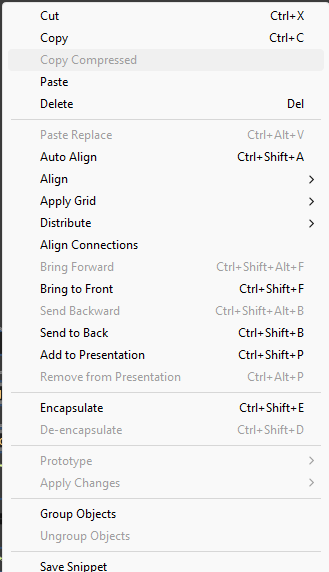
There’s also an option for “Copy Compressed” that gives you this:

Same thing, compressed

----------begin_max5_patcher----------
975.3oc2WstaaqCC92o.8cvv+NSPRTVW1qRQQgRhVlKbjCrkyo6Lb1y9gxNN
IMKNwqvq6hQtXSIKR9wORQ806uaV5hxWb0oIeL4gjYy9JJYVqrnjY8Blktw9
xxBac6DS8MaV3pRmuers1vxOm6W+TkaYnakXLHiXDJkPCTPv.vvlmjoTDFWv
oLNnYYYfLCERIz4IbNgl7X+JlupUOkKd9CLl9fhP8V1DJbgVyfeT+U1Mtfq5
Im2tnvEGj1OX2KD9xVWmkklNOIcg0uN8n5v0M22urrVg+282E+G+a9TBKTFi
vvKAPy3HbXTbDA3ThgkQEFD0jZgQpFArn96AVLbAQCRYDT.NUno.B.FIQEeR
XLHKhQ0igrH+SAUVzDBk9qSVLbhlgzBNEzJtTSQdgPwIYBClTkAYZsPmgBQ7
i186.vBL.rvdavxut7GsffvwwKE7VyeX+8vTLRCgiLEkDTLoznjFjnHLDJyH
4bJWoUfw.2lnPM+QPTb+CZsGrzf6kVfHsNe82tN8gmQvbmStLwckXDt3Lg.6
5zGp3V.02gEn04sESOZrwUWaW6t.bDrUghxxsWm6f9Hl8.X8WpVqks6HIABX
zJFEkIzbPF28N6FPB7CCICAF72LXTjuyQVay8GIB6rUdjxd1vO.ONFpBmqEJ
ASPYwhJRslfXjAwkLFmhYZySXfLhKB0.3hYnTprqkRcSZz7SuK98SEk1P7lh
75vI.KBMn2Y8dWwxxFe30IrU4NevFxwBLmp0WGM5kVa24V8jMDpxwhRti2Uu
OjzGShfdQiq7S8xOLvodaQoe8khLhCQlWM8MXfNN0Hbewgya8gOnnCLgxU3m
VsAWZ75OWVEtf8bQioOfbQM03yC0guzEIE6mvd17wadKza2+txt7V0351MTJ
LPLwVCXce09rbtBDbkQBbIRYaSni+NPBMc.lKchSZGpd95pxxctukfDrPscy
1B2H7bywqLrPtjoIbyoBw1HwFvuZsLyMOywsSKGnzFbFJ0MMjt4+tSg05iwA
NC6pKapV1q2Cs8lbhqrBArb+gz5GN5UIrjGGNNMdMFaT31Zr8vamNsxpUXGd
QJzTXDmu5Wws4SiaGO00Hb6X2Awo8dhzpAPZ1j32rea8a4.9MLI9MLNif8t6
2TX.+lOIFgXzYVSkaCuyZzLthGltZl+TJf8CXB+rxrMijsQ+MwFFSnX+Vp1s
a24pp2uJcpG6634x1WxLu64be2yc8zjV41k2+JpNQ1JrSi.1lQSUWqguH2e3
uzX+jU9l7djHB.QU21ZSrUx5s1NWssEn6uCmv+i8IeLG
-----------end_max5_patcher-----------

So you select either of those, copy and paste directly into the Max patch window and it shows up. What I don’t know is whether any of that is disabled in the post-30 day demo; my guess is it still works. What I’m imagining is once saving is disabled, you live with Notepad++ or similar open in tandem and just copy everything into it to save. Definitely more of a hassle than ctrl-S but likely gets around the save limitation until you decide whether you want it long-term or can afford a copy.

They also offer a student discount, which I think just requires an .edu email, so if you know anyone that might be an option. Also looks like they occasionally run sales (maybe Black Friday?) that gets the price about the same as the edu discount, around $250. Still a lot of doss but a decent savings over the regular cost.

Is this your card?

I’m actually blown away by this, and I’m trying to figure out why they even allow it. Theoretically I could pretty much just save my patches elsewhere and keep using the demo? I’m wondering how far down the nesting goes, for example, into codeboxes or gen~, but holy shit.

I noticed only the compressed version pasted, but still, if that’s an option at all, this is brand new to me :exploding_head:

Although on second thought, it looks like they might’ve greyed that option out on the demo, so maybe I can only paste things that other people have made. This seems to coincide with their ability to open projects, but not save them

Yeah, that’s it. It was just the smallest snippet in the test patch I had up at the time (not actually anything useful). People use this all the time on the Max forums, reddit and their Discord to swap patches and demo things for troubleshooting.

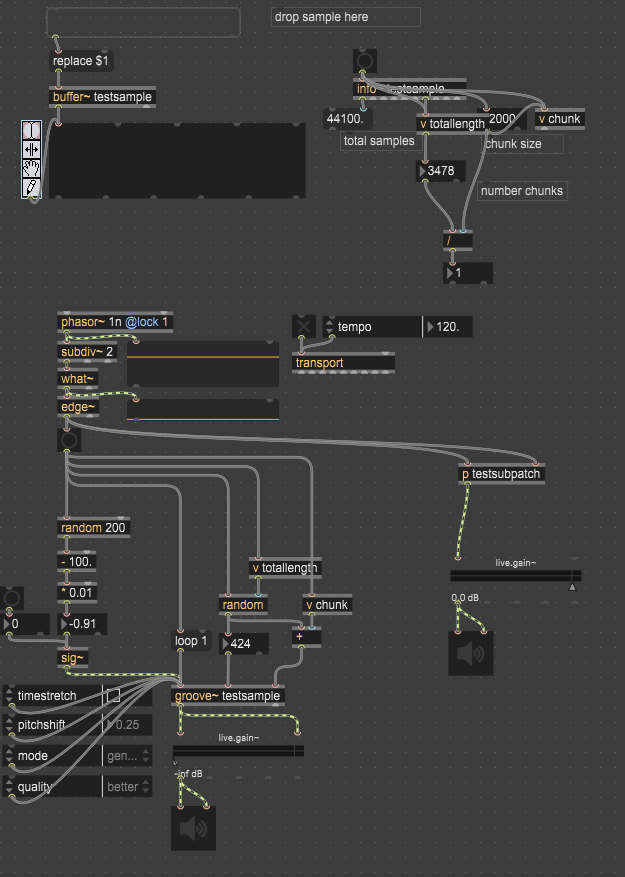
Try this one, it’s got a subpatch called testsubpatch to the right. You should be able to double click on it and open the subpatch in another window.

With subpatch

----------begin_max5_patcher----------
5010.3oc6cs0biiqb9YuUs+GT4jGxEuL.MtmbdH4ePdeyTSQKQayyHIpPQaO
ydxY9smFf5FIAIAsIkjmcbs6HaRJBfu9dCfF+se8Wt416y9Zx1am8uO62mcy
M+M7J23tl8J2r+B2b6p3uNeY7V2Cd6xzWRhdLNc82u8tc2+k370wqRpc6eG9
zgmXSbw7mRW+3mySlWT1dbIKhYzJhhyMbljp02MSHMQFFWJzBPwTbPhWjxjQ
j6lwUQjYeZ+aLcgq4xt+u9aTt9PCs94UYOWrLov0YEGa+brCVjj+4j0w2uz0
Uo6uY4Wn3aaRJ6Y2tM8w0wKu8tS+M6++vxr3B6urLcKNJNzWPrAGdwqWmrbd
1yqcCPxg2ddZx5h3hzr0UZUrmltdeGE1e0swujr3ywEE4o2+bQxwea6NZxdh
hE0W9bR1C6u9gab5ncY15G8QZDGHMUd7UHk19nV716sScigeSQZ4AxVf+mq0
X9t+1mxxK7ze71Y1SP71ROuNsXaw2Joj7cOve+W+kxea+ur6S7i6Bl+N4OVD
O+6ClyUxYQJCAuJgRPtWMkirrBGiqnUFWSKLtD+bIu4A05jWwF7PiUj7U2X4
1MyPNqhsOeuaX14fVwh.BHACCTJEmv0VQRQjlhCYM2HXLhlRualVYGz.z5fV
0xftWAxiuO+BOttcRdCIkGRWl7RR91Zhf2ba7lMmb8ZRQqh+qYt2k4HCH1pk
W6Dlx7jWR2+JTGubbNBgEH98bdI69Wk7S3ysxI4qeN00gNx+dnq4ncVQksah
mW9Brz3C2+HkgxnkrYLl8CJgXkNmozjSn.2b6i4oK1l9G6fzxuBUT4QpXMnB
XbJCV0aTiQyQUNNL8yKATdjQwzRpfJD.PHrR062MiQ1+uG6W0XfXUd89Yg7y
Fce75Gus56sBiD4z6LOa0pjRc42VoESWuH4qGEGqn34fX4aC8J6w8AeTtLBT
bAEDnznhQkFD9PKmggePG3GoUrgNLrgN5XSPbVF8dOEBBJnWKrRiObg8l6QU
g8IIJoQT6OJTcAf1srlx.PGQIbgx.TBZHio.zyLRCs5MPSptC7Dp1UZ5OFoS
.251Uef9kBEsNn1PfjpnQZifCJJQooDihGHJp9yIJtCaPgWEE3.XjRiPQLgx
7I+QC1P29KP2J50XppowTJvhPdQNxQRzVGRkbKzVBvchhAacc3n30JiGpkKh
xHJfSnfVfBth2i3K8Om7gFdD29iPy0bIGkdc9htmkqOFOh4GJFuJwaUMlKLX
lu2qEEjSSJXBixHHFlf4jeQFOv9ijnwfvzRABwLZ+rjD9a1Om5QdcN.OLlms
wOlzB5UDmWrLKaSePHFFJH3FBC8eQpQ8iVOav.OX1nzQGcHVTzdQgH.D7sGz
QWX23GAgubpzdF5Xe5MwHxXlHsz.ZsDXLFXTJ+YoqNNZ5RHWzmPdPbpglztd
SbWWIuq8bPDXR7pQCalLu5OPHI0iWgZ1ah8BJ4dgjfuAmjudSzWHI6qlTS0+
3bnG+w7rrWR9dYFzhWsYYRHAtiNSvYbNQonXvUXbB.F3NFjEQfl.MLz6Ms06
CJuWkRlfi1peYkNzQwZATOIuQKSW2Zdibvf8AZAt2l8b9788qco2YVsA8BDg
SWePJ72OwWU6iFNUevcFqBqv5Mvj2WnACLDyzCL5P6M9fvr7Ekookd8zEosz
EISIIkDL299Qyj1a3WU8FS3L7rN3wforSRGf5J5UElYyWRqXFaRwrAnIiecg
YpKjtLus7EDyn5Aoo.tdnf5NnfSppdexac.YzVgr8238LI2Nux2NOaSRmyzM
kSiDFpfREbkPJ3RL.OJMRI4JpVaHT7+.q+pBHRR4LMv.oD8qkIcdu5RWAX.N
dctl0xDBy5aBgyiW+3Nv72HQ1Y3z9CEitGgUr0iNZ7tur+L0yn91mueQ5Kee
FzEtpfHFJmJYRhhQo.GiC.isFwZtRCbJPD.Uf3pjzyboCs.crAs3VRWWzFBQ
GcDJYwicy04Cc3DcD2Hsq3BlccWPUT7hPOnCsEzA5lY4ttYZFeH40mhKFLjv
zjHlAnRs1lbFswNMcbZOPBYvPxDyl7NTE4UjwqpHLvagfSLDfP03KfH8COLy
GPUQEYO93wjO3C7XDYjM+cFl1HDn.DAkdXfJhauHxRI4Zt.zdSUe0Y2fzG.0
U54ahHmUMOEHwa6lr7hgiURdjhHz3EUbThiYbytAqagMRaqzISm3wcG93PtK
a9K9dpymUtMOEuMK+6ynqm8etLa9WlQGr1KjGipYDpToT1jdYmeMTDpGDUN1
qcr2LzXSp6yocxIwTQRowvMTTeDfZi.63VGoDZplvJWNcD6ZEPzicdh9cI1Y
6qkR.Iq1jcaqX04ST7kYEYEwKWlr9whNW2gfjEYWBJLkjQzngeqVVuKSXUOR
irgy6bEhGbFMho.gDjboFQ.t0lGHiPVLkA8wlKorPPCw0.ZTY948R9YrHENp
TJfvLbJyNbkbAJCQQm.XHBf2PK8N27UGv854yvrbc98R7ecvlsjLSD5UD5tC
WpjflqrS3fIRzEPAlAyYzgU72tB1pK6.+9DForqwEpcgpIAtcYWILlHTFfit
DJAzZslGfWMvH6UyDwWzqzhO.QVpaPaufAUfJkAHr.zOJBK0Vr.GkVrqQftc
KgpQuMXBiPgtyQXDzLhU2BDwsKL.7OcqveV+QUYFOKKSPBINY4lDpyYRgIhq
TTL7.pjZXLi2EZREL.FYOydmQTFzNTh9oAyenr6lCJhVn0V7NTig1+NTRa94
FTZXaPI1O2fRu8MnjWFWLjiHM53nBiymQDDAS06FTxPNS6OIjwEeSCVM0avz
lVO4V1dHKeUrqaKOSdF9uLCGzCNDbgAcWPgwNPPc7nJMA0tMb5A9F9l2pToz
Yyd2u4V0oCFK1sm9n1kEHWCLoMqOltwBw0NVjGudQ1pY.gLX7.iR.i0VoQ4K
BXWWuxdioTyuBbCp+nF7N8BnGdTUYVPsATpHhdiZPCeHBZnEVi1W8Zg6prQE
wzBziYCWnjRtEI8sx0NE0T72wDPzsGirIHqLye540eoy3topHNQKnDgDsspT
Bab2Xv31EMqTps6FHswl0hdLLIthyNUodjgmmFev.uakpzq3PoBfcPfCOC9C
F3HXrJXbgG.tXm5gAPdMvAreqJ1XrWl7gR.XamInz3lUVpwoGvTpWUp0bCUC
T2JdkzFsWpFj+lSvvzM9l41mzcNFQ0g1bQqDRiAXbax1n1v+DZMnwKSjJCAP
utQSl3kXnEELLZACTcN9kW5wuKKzyJMHzIYlUtsInbGYdfCSwYZX1ZxgxS1r
Lddxr+wNcZV5FaRmWORQ2ZuUWC5s5MAg6ENCRgD6CSR.CXfKzQz5yEGnD3EQ
oWE5FCCwlV1ieU187pO5Siv+1vwoc4DUpb6cJ2VgrmYQ.jWGShP.bFLRjhpM
RkFMditwJrSD8tpcB0nQU4ntNqcq93LDeT3L5OFIlzUHEjPKaeyJpyMeDhC5
98EGlCoDNM4Uaga49zkoEeqJq4COrMYGR3n4UrjYWuCIKVjG+3144YKWVYzL
eY57uT7Td1yO9TkaTNxexyWo7Nu34Nksz9h1xgKe+i6yg4wKcbMr1IU0o7ur
NwTZBPYZial8dLnkfRcKZOaxj+LVwdx1jr9jHpU6JSRkFj0N4MfUY2S59Joq
2jmr06tPLjZ5yBbrNO40zEEN9wxFZDK3OaRmWrcY5hPpRFt5wBXsaPcAApj0
2damNTO8qVJD1wW79LTk1J2LNTeyIVc8qE5dlKO8wmJN79proPSWg9TtJd6W
Fgsl9Iq2qpCnhrMsz5qimWj9RhqWz3tsxqXu4WVmcukdUtlSev9mQarq20SA
xu735Em7PVt9sMdp126qqxdI4or7z+HC6EKG3ppeD1UlalgCrjuss+M1boiv
JKWkn+caIUDJmyC3HeuPI0tnUETszr+mdquC03CrusCSH0+UdpMQXAUilpoZ
swNNtMUrsols4NR1i511T41gZ2.T81p52ZpfCQMb8hmlZmRyR8uk0OJATW+h
UO5CwOur3yUnt01ozAnO1uZ2FXacQglOP2Az2Tt3eZ6lj4H2yrhmhW+ksyJx
l8eif8+biugOYEmoJSoyCpR6U0GT0cef23E2dkFqbhk2OYo29TxxMVtyOuL9
9jk9dO9p9DM1O3UTx79Q3l0lsVyEJTNqppxEypX++1IfQGLf0pnem0br1Jgc
SM74ondTacpjTbR5XBAe4rHghxoGVD91UpieM4MWMf8f1MvyJx8PTCpQO08i
tp8GSMz2zbYUjOHPW4LTRKsTxDAgxL5jixMbbJ.ilWyzBHHA.RogkAQKH+jV
LPZwxr3Ek6Gr.LQVV8MKyZBMHJBXlbJRyBe0ahjPuZHIaeM8j5Tb20ZEdDP0
JaRJKi7TRhLfQpUG8EO.hj9RXnXnDH10CAJY4rUwyQUAYaeZ1qniFYutc.5z
fconJLy3fnGpCabDgt63m+PQsxm8OP97iX25aaKRVM.xDgV9gLLxD7QPHhb8
3K7+w+SN9ElcfxzMYxVFBNrrdgfMVUN6lTMauWDcSCoeDngWONOjttXflora
w8Fwyvfvhm4mN2MP5yprEoOjlju0tbQChRAzH3XHPThHRvbE+h9oN846sXTH
O20wG+H4D3b67jMPYKe4JPFlrUeFu3ueEe2cx+OBTpl4BZ4xOuHtHtFUnNYv
9j6LiTePcys6+9+dk2Py2gcdFR9luLVcXOgraX6lEy6b9L5nYep9iWiqp6Vi
FXq4pcruy1BBrsrSFx6ssXA1VKxie0eaU+h0xX9wc0CxsiDhVJWod4WZLOu2
b5LQM+P59kM5AWMZS9+FZzjZ0a1LM6mlo66T8n00tfadisSPSCvOvLryGJ3G
H31549Qi7v+JJkY2bPeelUnc1tv.11d54udr49W9KyBK27DUjRW5VztI7OrX
DE+TzXntA8jqTDMLsWLL1uFBPhvRXobxS1xOvNsV5jyLxPoWBnI8xXNHi0GM
S0CMCFsDj8Ckr0l3uLT2BDdhvHPce5elZk21LseZDdCZ11MWhIauOkQ0VkHM
pp5dPVekgTe3aixQZyxfZGEjz50Y8Ay.7l6lpFEl6N5lf+wjmBz6U5.vSwjt
5HfbgFAAyoPuXbJxgzMUWrtoXHcy50A3yW2j+wfnynCoeB5KWGk7QoiNj9o7
h0MAyfvyKGGJnGp.+EpeJFhgJF8x1QC2yExkqiBChEUb45nCoeZtXcS5fTMQ
4WtNpkmiGZGUbY6mvfrIQubcT1f5nvkoiNHI9qvnUFz.3cGsxoznpyIUHyGU
0MyRsckwzdpvE3wzd41+nbY1Dx4x9E8fYepNN2nhfOA0NCGgZM8xo0CJllO4
pzEaxRWWrCaDtc.uk95Nv9H6o1G+KnbNq361o7hI9L4I3wlnSfdLNeYNLSW8
WdM1U6LAgLRnzFN2.Tt8jF8tYJQjhRDfjwUTIgwLsbnDbnU1lTreuQS8u8kO
TR9t+4GdH4XUAc02pUErZo1s0cU42U2M6nR7KF+RYBm2W8tiUtrzCqnez+A7
vEr.Lkt9grPKYY6JgAlxUpJk0Y4pn0xqOoe1g8z7P3O7c7MbFKhSKxy1rq39
L6oj7NwOPWJWtaulP1+G9qcUmoB5ic.X2ZfcpVgdR+13LBaqcwd62CuXzMMT
r1X3KUREJKeoBUS4F0jn5t39L3Q9Ad2oo.cz+4owtJsGgRzZI0.1Jys+ZPXu
mE.zQ53zHEUKWjmbxdR4bTj1daPkRnhDMpb08BUv3.UkKSsqdLRqi.z2C64Z
mFQJi0Mj9wH13fQ+uOG6pEMW+vDHiTFk85ZhRSbGj08CS7wAl1X2CXaeJ8gh
2ORU9XUC4YGxU2C783WSOu4Uiat0TRUcx.qGnrWx2zzIHd5DzQoSnBqSbZht
euMoNrlzLoi6AzIlJN.sHj9fVMZPulGTCJFuFDBpA4sPo4iQWHHFb8XxeSBi
0h0xndbTt.g0IHi23lHCqIgIUtNHkp515Cv4jAfNk.QfTClYJ4BIgokkLdp3
bm2km2lLLkbtSytSerZImTSizMJx8JSj8PGTIABQoP2Vc0.UVDq94qmmmbpX
rLgMZESoDFKHKmvHZHCeSxfGzixPLL42Sliu2YCBAQXsmF.mLGj04hYTY4QT
akC0NKyIgHU1iwWL9etzUNZItRMe0CnflO4nL3Tg43SMm8pM1rolpQOVAZmf
mlSLZlVpjt0rODzSNQpcGvncpL+XffYlFlJQoVEIYJPI.aI.lIAa79bhqbGK
znZQlPnsDgg8jMSIkOpsmmbT3OMxg.Wih5ERvs3HoegQO6iQ3r2hrydKxO2s
XXl+ISnxkfFxhwyAufb1nz9I8Lhw0MXWS6IvYQPiC3EFKRqDtRCOwc7YY2zK
dMZ27ImpnDffFu0MozX3FAMNIUELmEDkRCLB0fFeuyuUklO3H4TUXQiTY8td
NhFQ7FhEgz7bFfAxHS8yRIOO4Tk.sfFql2PfWFcjjfFP.gjJH.ZruEOB77jd
FrrwXvpGhTx4Kt1gCtZs6PfjHzFJ5dFmHuyu1JOO4DEQoNnfermtlSW1fCuK
LUFVCyEMoXJSYj4h2EBLmUil0dQPYnlMZx0gQksmGLd40GEFsff3wynHDT7U
v34xHHBFiGoF7bCogInpaQNkc15ArPyx9tIVtVgz2050Kb90KX9dJT9cTf7a
TX72sTpaqP3+q+B9.++vbg9TG
-----------end_max5_patcher-----------


No idea about Compressed, but I’m not surprised they’d disable it in the demo. Curious if the raw copy works. I’m guessing you have the demo, so try just selecting a bunch of stuff and copy/pasting to a notepad. Then close and reopen Max, empty patch and paste it back in.

EDIT: Make sure you have the patch unlocked (little lock icon in the bottom left) and select stuff (ie can move it around) and see if Copy Compressed is available.

1 Like

Yep, everything you mentioned works. This is absolutely insane.

Is this just one of those soft, ‘wink, wink’ moments where the demo is actually entirely usable long before you cough up the cash? I think they genuinely want people to get into the ecosystem long before taking the plunge and if that’s the case, this might seriously work.

The real icing would be if the M4L demo did the same. I know they have a pretty hard cap on gen~ objects in that version, but as mentioned before, I’d be more willing to start with high-level shit long before getting into any of that, so that’s not an issue either. This is so insane.

Copy compressed is still greyed out, which doesn’t really make any sense in this context, but I definitely don’t mind saving the long form version into text files. It’s really not all that much more effort, which is confusing, but also freeing. I’m really surprised they allow people to do this at all!

Just so I’m clear, you’re running a demo that is past the 30-day mark? I ask because during the initial 30 (like if you just installed and registered for the demo) everything works, including saving.

Sounds like Compressed is a full feature, and I’m not surprised as it really does skip the whole buying thing.

I’m no Cycling spokesman but I’d guess there’s several motivations here - first is that having to copy/paste out a huge block of text for everything (which get bigger and bigger as your patch grows - that thing I sent is already massive and is definitely a tiny Max patch) so there’s a lot of overhead there and if you want to go through the trouble, fine, but it’s a good motivation to buy the product without cutting people off at the knees.

It’s also super useful for troubleshooting, which applies to people in their first 30 days moreso than people that have uesd it longer, so keeping that functionality in lets people really get their feet under them and questions answered during the initial break-in period.

And last, yeah, they just want people in the ecosystem. They’re fans of artists, they want people using their software, they’re not horrible corporate ogres, and I think all that in conjunction with the sort of people that gravitate towards something like Max ends up with a situation that is basically “the fact that I don’t HAVE to pay you for this awesome thing makes me want to pay you for the awesome thing”. It just solidifies the good will in the best of ways.

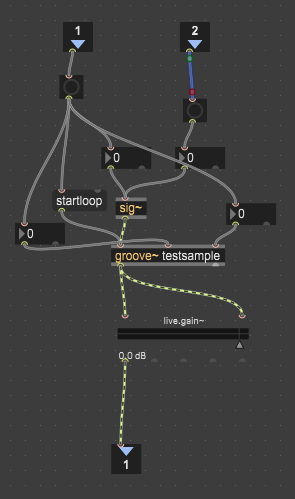
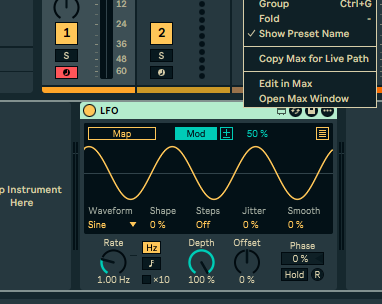
I don’t know specifically what you’re wanting to test, but Live’s LFO is a M4L device. Find that, drag it as an effect, right-click on the top bar and select Edit in Max


That should open it in Max, then you click the little yellow icon at the bottom (Presentation Mode) and you’ll see the whole patch in all it’s glory. From there you can do the usual copy/paste.

You can also add a M4L device like Max for Live > Max Audio Effect for a blank effect and do the same process (Edit in Max).

All that seems to have the copy and copy compressed options.

1 Like

Yeah, I never registered it and it has the nag tab up top still. If I’m correct, I can use it this way indefinitely and eventually start the 30 day trial if I want to export some RNBO project or something weird, because I think everything is unlocked at that point. If I really have some motivation to use the full version later for the 30 days, I might have a whole shitload of stuff to rapid-fire export so that could actually be pretty cool if / when the time comes.

I’m about to test out the M4L version, but this is going to be one hell of an educational suite as it is, even as a demo. I had done a bit of stuff with PDLua, and even dug into the clone object with subpatching and ultimately realized that no matter what you do, rapid iteration (without some degree of doing everything by hand) is still a technical no. On the flip side, I already got objects to spawn in Max via JS, and I bet wiring them together and actually giving them whatever arguments you want is just as easy or doable in some fashion.

It’s funny, but even on a surface level it blows everything else out of the water. I can’t imagine what it’s like when you get really acquainted with it.

I guess since you have Max installed, I’ll mention that part of the second patch I sent is a “playhead” for the sampler thingy if you want to play around with it. Use is pretty simple - you drag a sound file in where it says “drop sample here”, hit the bang above info twice (to get and pass the ms length of the sample), and then hit the X by tempo (also need to make sure the DAC at the bottom is on/lit and the gain is turned up).

Relevant things to mess with would be the chunk size up by info - that’s the base length of the playback in ms, of course play with the tempo itself as well as the subdivs. Timestretch is also a lot of fun - turned off it’ll pitch slow samples way down, turned on you can get that good resample glitchy sound and can further modify things with pitchshift and mode for lots of fun.

As a ‘cheat’ around reading a bunch of files in like you were doing in Pi, I really imagined this with longer samples where the playheads just pick random starting points in a long track - I figured since your 5 sec chop up was arbitrary, using something akin to the full, uncut file and then picking random points would be about the same. I’ve been using ripped movie audio and it’s been working out well as a test except when it grabs a bunch of silence lol.


Also and not really related, you were talking about iteration and reusable assets - check out snippets, the little paperclip on the left side. Those are reusable chunks you can save and drag into a patch. So if you have a common thing like transport or audio out or even a delay unit you can save it in there and just drag it into a new patch when you need it. I don’t know if that’s what you were talking about but I’ve found it pretty handy.

I’ll have to try your patch again - Max just went through a really crazy spell of crashing and not even letting me use codeboxes properly for a little while, but after a reboot and no copy / pasting (yet!) it seems oddly stable. Also the codebox right-click menu was so translucent that I couldn’t see or use it initially (which I thought was some kind of limitation as well), but now that functionality has returned which is super nice.

All I ever really wanted to do (at least for starters) in PD is stuff like this, throwing a ton of oscillators, FX and wiring around like a mongoloid, and then see what else happens from there. I’m sure (or, I hope) there are some methods for clearing and stuff like that, so that patches can be constructed and deconstructed on the fly. The closest I ever got to functionality like this was with Bespoke, but their system is terribly unoptimized, and as usual, there really aren’t a whole lot of high-level effects around.

Also, if you can even spawn reusable assets like this, that’s going to completely blow my mind, too. I see there are Ableton effects in here, the whole BEAP catalog (similar to Max For Cats’ OSCiLLOT, if I recall) and obviously everything both Max/MSP and gen~ have to offer. I’m crossing my fingers about that onslaught of crashes being a fluke because this is fucking awesome.

I think the part I hated the most (so far) about PD and Reaktor was having to wire shit up constatnly. Maybe my workflow is god-awful (very likely), but having a ‘connect’ mechanism is a real godsend.

Fuck, another crash. I knew this was too good to be true :joy:

V8 Codebox gets really angry when I have the reference open, or something. Flangers also feel like they’re going to take down my entire system (even singular uses, without the crazy stuff). I don’t know if this is just me, but the stability is always what seems to get me with Max. I wish I could send error reports or at least recover my work, but these crashes just keep on coming :crying_cat:

Last ditch attempt might actually be Supercollider after all, since it appears as though it’s meant for tasks like this. The syntax kind of scares me a little, but I think it’s the one thing that makes the most sense for a workflow like this. There might even be a decent amount of externals out there, and with VST support, I might have to seriously try to understand it. Gulp

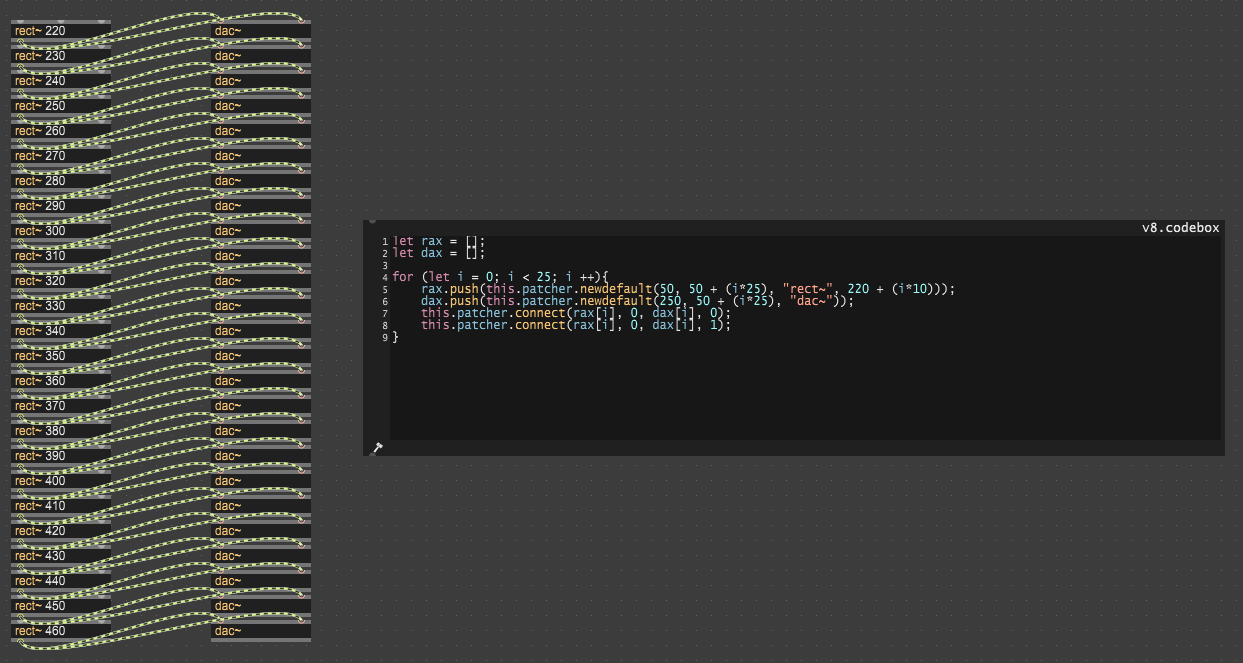
I don’t think I’ve ever had Max crash (I’m sure I have but it’s uncommon enough that I don’t remember it). I obviously can’t rule out things external to Max (the PC itself, audio hardware), but in the above example my guess is your problem is the 25 DACs. Those aren’t instances of the same DAC, they’re independent connections directly to hardware. What you have in that picture is basically 25 (very lightweight) DAWs all trying to write directly to your audio driver at the same time. I couldn’t say without looking at a crash report but my guess is you’re hitting resource exhaustion, hardware interrupts or instruction cache issues on the CPU with that many DACs.

I just tried your patch above with 25 rect~ connected to a single DAC and it worked fine. Again, not a great test since we’re ignoring all the differences between our setups but Max seemed not at all bothered to spit out 25 oscillator signals. Might be worth giving that a go and seeing if you have different results.

This is a good catch; it had crashed a few times before without any dac~ objects involved, but I definitely do need to treat some of them less like modules and more like potential resource hogs / systems, especially with a lot of them going at once.

I also figured out that safeguarding codeboxes with a bang function is a necessity, because otherwise they’ll just evaluate whenever the hell they feel like it (seemingly when switching from locked to unlocked modes, even). Maybe with those two strategies combined I’ll figure out how to get things to stop crashing, but SC is still on a very close backburner.

I did install the ChucK evaluator external pretty much immediately (not that I know how to use it in the context of Max just yet), and I’m hoping I didn’t introduce potential bugs with such modification from the very beginning. I’m still enjoying this weird exploratory process so far, though, but obviously more conventional tools become more available with deeper knowledge. The worst part is just not really knowing any of the lower-level DSP concepts and not being able to take advantage of the millions of “hey, do it yourself” frameworks everywhere. Otherwise I’d probably just use Beads or Minim for Processing :smiley:.

The robust documentation of Max is awesome, though. Sometimes it’s hard to find a few things, but usually that’s just a case of me asking the wrong questions because they’ve since created a new way of doing things. There are almost too many ways to get shit done here, but it’s obviously where I want to start.

Not being able to save isn’t a huge loss at first, either; for any newcomers, definitely use the demo. Most of the crashes that I’m experiencing are likely my fault, so I’m not in any rush to save a doomed patch anyway. It’ll be a long time before I want to keep something I’ve made, and not to sound like Mr. Anti-Piracy, but this really seems to give you access to everything you’d ever need. Blows Pure Data out of the water with the modern scripting tools, too.

Shit crashed again with 50 oscillators, 50 VCAs and a DAC. Sounded pretty great as a basis for starting a cool sound design project, but even though the code evaluated fine, something about manually deleting 50 oscillators and banging again for the next 50 just causes the program to freak the fuck out, apparently. SC might be more up for the task, but the visual component was really tempting. Especially for the GLSL tools and all sorts of other great stuff.

I’m almost wondering if there’s a memory / object cleanup method I should be calling instead; something that instructs Max to let those ones go, because it seems like it’s acting like the resources are snowballing or something weird.

That’s wild. Do you have a copy of the patch or could you recreate it? I’d be interested to see if I can get it to run, just to rule out that it’s some innate instability or limitation of Max and/or the demo (ie it’s a ‘you’ problem and not a max problem :laughing: )

Also, what version of Max and did you get a crash report of any kind? It’s apparently located at C:\Users[yourusername]\AppData\Roaming\Cycling ’74\Logs per https://support.cycling74.com/hc/en-us/articles/43551688934419-Max-crashed-Where-can-I-find-the-crash-report

Hold up. Why are you recreating the oscillators? Did you do that while it was locked/running? I could see that definitely causing problems.