Been using reaper for about 5 years now. I love it. My go to mixing daw. Soooooo many routing options. Infact try to think of a way to chain vcv rack into renoise and renoise chained into reaper. You gents have any tips?
I installed Reaper a while ago but I really haven’t been playing around more than a couple of hours with it yet. I mainly use Renoise, but I got Reaper for multitrack recording. Time will show will it be in more use in the future
1 Like
Have you tried using Reroute?
No I haven’t. Did you mean this?
Yep. It’s a virtual bus that you can open up as a hardware device for any app on the computer that can use audio drivers, and then send it from the bus into reaper. Kinda like rewire, but you can use multiple applications at once. I use it to route signals to max/msp and back. Works very nicely.
1 Like
I’ll check on it. Thanks!
Total nerd alert. My buddy has a behringer x32 mini. We just got all 32 tracks recording independently through Ethernet. That shit was cool to setup. I must say I am becoming a huge fan of the x32 for the price point.
2 Likes
This is an absurdly necro longshot, but I’m getting back into Reaper with a few similar aspirations myself (to serve as the ‘hub’ for other DAWs to connect in and out of) and I found this guy, here:
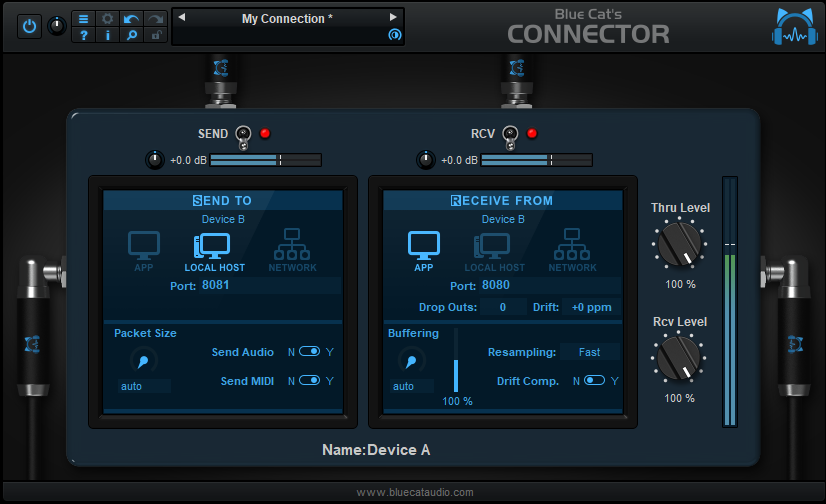
Leave it to Blue Cat to come up with some of the simplest solutions to the most obscure problems, but this pretty much does it all. You just patch it into and out of a port (I’ve also used random numbers for additional ports to great success) and you’re really only limited by your CPU or RAM constraints.
Beats the fuck out of virtual audio cable (my previous choice) because you don’t have to waste time setting up and configuring audio busses. Just pipe shit all over the place on the fly 
Also, eyeballing that ‘network’ feature, I wonder if that means I can bounce audio to an Orange Pi running Pure Data some shit. Now that’s the kind of impractical bullshit I’m talking about
1 Like
Is there an easy-ish way in Reaper of having a 303-type bassline transition over several bars from bassy to the familiar squelch and blip of acid? Live, I understand, you turn the knob and it does just that, but how to do it in Reaper? Thinking of broadening the stuff I’m making and I’m discovering acid classics like Acperience (finger on the - ahem - pulse, me).
Do you use plugins (Vital, Serum, Surge, etc) or do you want to do everything as native as possible? Whether you’re crossfading patches, changing params or whatever, that’s what macros are for.
There also might be a sound design thread around these parts if you’re looking to get into patching
I’ve got some plugin synths - just downloaded the JC303 and I have a few others, but I have no idea about what a macro is or how to use one  or what patching is. Assume I know nothing and you won’t be far off
I thought about using like 20 tracks of the same instrument and the same notes but tweaking the sound slightly on each one and running them consecutively which would give the impression of a dial being turned but if there’s an easier way (for someone with little technical knowledge) that’s what I was after finding out
Thankfully it’s a lot easier than that – and that method would likely result in quantized (read as: stepped and stiff) values and take a lot of time to construct and crossfade. You can actually get much smoother and more fluid motion all in a single patch (presets are synthesizer patches, but you can also make your own), even if you do decide to crossfade between a patch or two (another valid synthesis technique).
If you want, you could make a sound design fundamentals thread (unless it’s specific to Reaper) and I’m sure a lot of us would try to help you get started and demystify concepts. There’s never a question that’s too simple to ask about, and it helps other people understand concepts, too 
Psych, I created one if you want to spitball there
2 Likes
out of all the old threads on this forum to necro, it’s insane you guys picked this one
2 Likes
Just wait for my EEL2 phase, I’ll probably be talking to myself a hell of a lot here 
oh is that ok with the moderators jeez
2 Likes
I really want Reaper to work for me. I pulled in some audio tracks from a remix contest a couple of months ago and when I changed the tempo of the song, Reaper automatically time stretched all of the audio, which I didn’t want to happen at all. I just wanted the tempo of the song to change to match the tempo of the original audio. Fought with it for a bit then went back to Sonar.
That’s kinda been my experience with Reaper ever since I discovered it around 08-09: Try stuff, can’t get it to work like I can in Cubase or Sonar, get frustrated, stop using it for months/years, then circle back around to it.
wash, rinse, repeat.
1 Like
As frustrating as it is, this is the default behavior for pretty much every modern DAW to showcase warp modes and enable a quicker, intuitive workflow while using them. You can almost always menu-dive and disable it (it’s never that far below the surface), but they all do this now.
(Most people doing remixes just want to plug stuff in and have it work quickly, I guess, so that setting has won out over time. It’s handy at times, and a hindrance for other times)
Bonus point for Reaper, though, you can almost certainly create an action / macro and a button to just disable it so you always have it on tap. You can’t do that as easily in other DAWs!
I know Reaper is considered a “difficult” child, but I’m not sure I could go to anything else. It seems very powerful, although I haven’t even scratched the surface of what it LOOKS like it can do. But it makes sense to me. (Admittedly figuring out how to play a 303 track “live” and record it onto another track took me long enough to need a shave once I’d finished.)
Isn’t this pretty much what ReaPack is for? When you don’t want to have to make your own tools and someone almost undoubtedly already made one?
Out of the few times that I’ve used Reaper, it didn’t really seem all that difficult. There are just a shitload of options at every turn, so you sort of need to know what not to fuck with. I maybe for a first-time DAW user this would be pure hell, though, so I could see it having that reputation for sure. That’s sort of been my beef with all things FOSS lately, but at least the documentation is solid for Reaper.