I’m putting this in the studio for reasons that seem sane, but the side room might be a better choice, depending on the general direction of the thread. Feel free to move / remove anything here; if additional warnings need to be placed anywhere, please feel free to do so.
Additional notes
From what I can tell after a bit of research, both AU / US laws seem to be in agreement about RE being perfectly fine, as long as people aren’t trying to defeat DRM or some horseshit like that. I’m also obviously not going to be butthurt or nuthurt if this thread gets removed. Also, if we need to strictly keep brand names or entities out of this, that’s not an issue and likely also won’t interfere with any of the potential fun or value of the thread.
First, though: This isn’t about doing anything shady or stupid (obviously, see above); this is about the ethical modification of hardware, software and creative (re)uses of the aforementioned, for educational and / or artistic purposes. A few examples and reasons for such a thread might include:
Manipulating / glitching a .JPG, .WAV or some other type of file for creative means
Circuit bending (thanks, bfk – I can’t believe I forgot this one!)
Forking an open-source project to fit your needs
Modifying an audio / visual tool to create unintended output
Creating custom drivers or firmware for old devices
Creating custom scripts for larger pieces of software
Modding games
Repurposing or otherwise gaining a new life from something that already exists
What sets this apart from the prototying thread is the idea of exploring and repurposing juju as opposed to creating hardware and software from more ‘raw’ materials; changing the intended use of something, learning a little (or a lot!) about how it works, and diverting the output.
I’m a lot better at cobbling stuff together from different things than a 100% original idea XD
Someone out there has done a custom firmware for the Akai Force. I keep hoping for things like that for the modern SoC-based Akai hardware
I know at some point I did something with changing file extensions and then running those files through another program for crazy results. I’ll have to try and remember or search it down. Iirc it was renaming a .jpg to .wav and Audacity but I don’t know atm
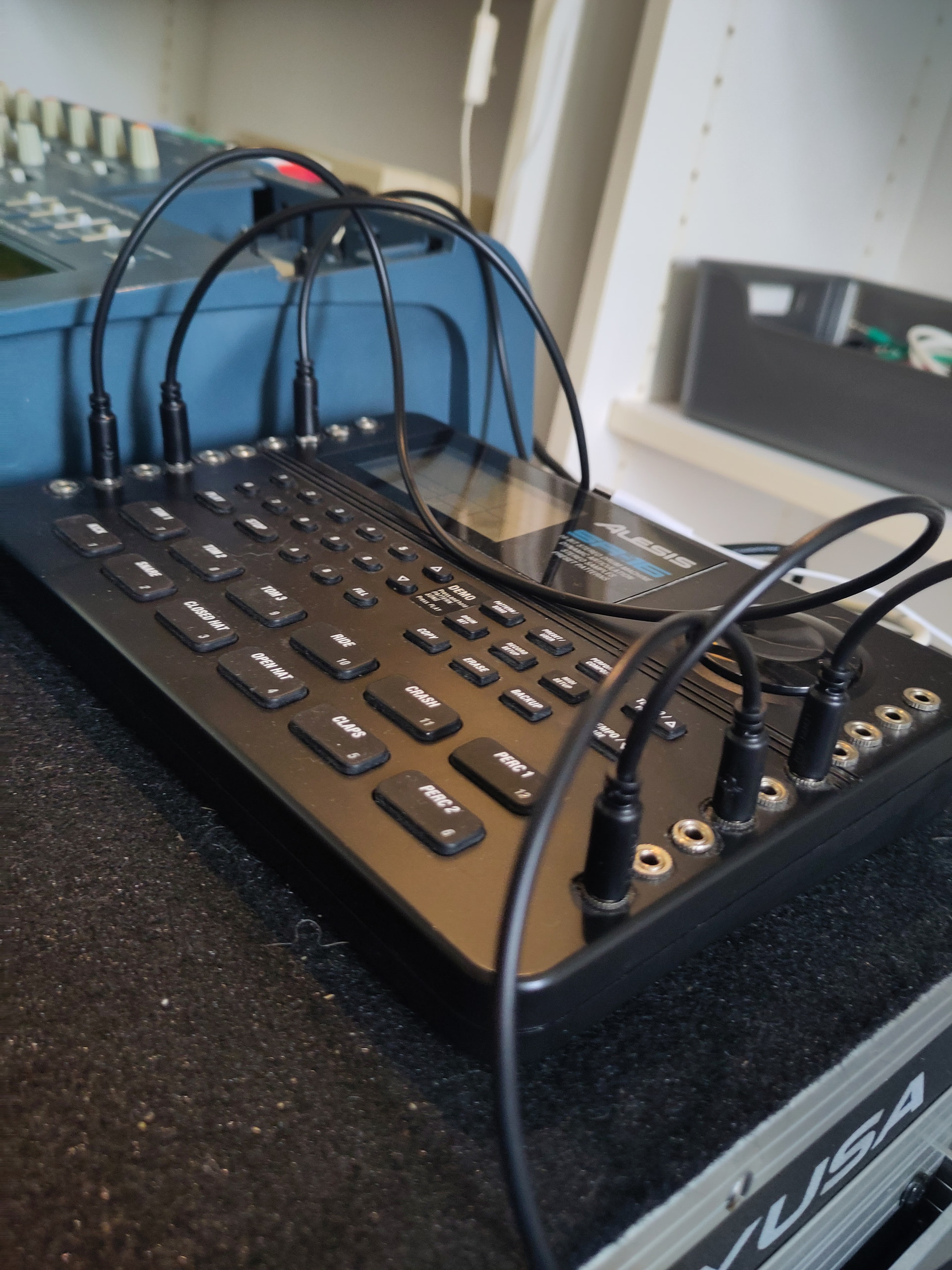
Nothing that fancy. I found a bunch of interesting bend points on the rom chip and wired them up to jack sockets so I can find cool glitches while playing it over midi. The older models have through hole components, the later versions have smd parts
I have a Minty AF Boss Dr 550mkII but it’s in such great shape I don’t know if I could do something like that to it XD
But those Alesis are a dime a dozen I think and even still being made (but I just saw yours is probably old enough to be through hole, that’s wonderful)
haha yes, you probably could do it! I was super pleased when I found out the Alesis was hackable after I got it. I bought it second hand for like 60 bucks, so I was prepared to take the risk of wrecking it. For science!
I’m still pretty new when it comes to fucking with binaries (and very much still in the learning phase), but raw JPG manipulation looks pretty enticing, as a launchpad.
I was doing some bubble sorting on pixels in Processing (a pretty inefficient / beginner-friendly sorting algorithm), and quickly realized that high-level prototyping really wasn’t going to cut it for more surgical tasks, because it takes way too long to render - sitting there for like 5 minutes every time I do something cool just isn’t effective.
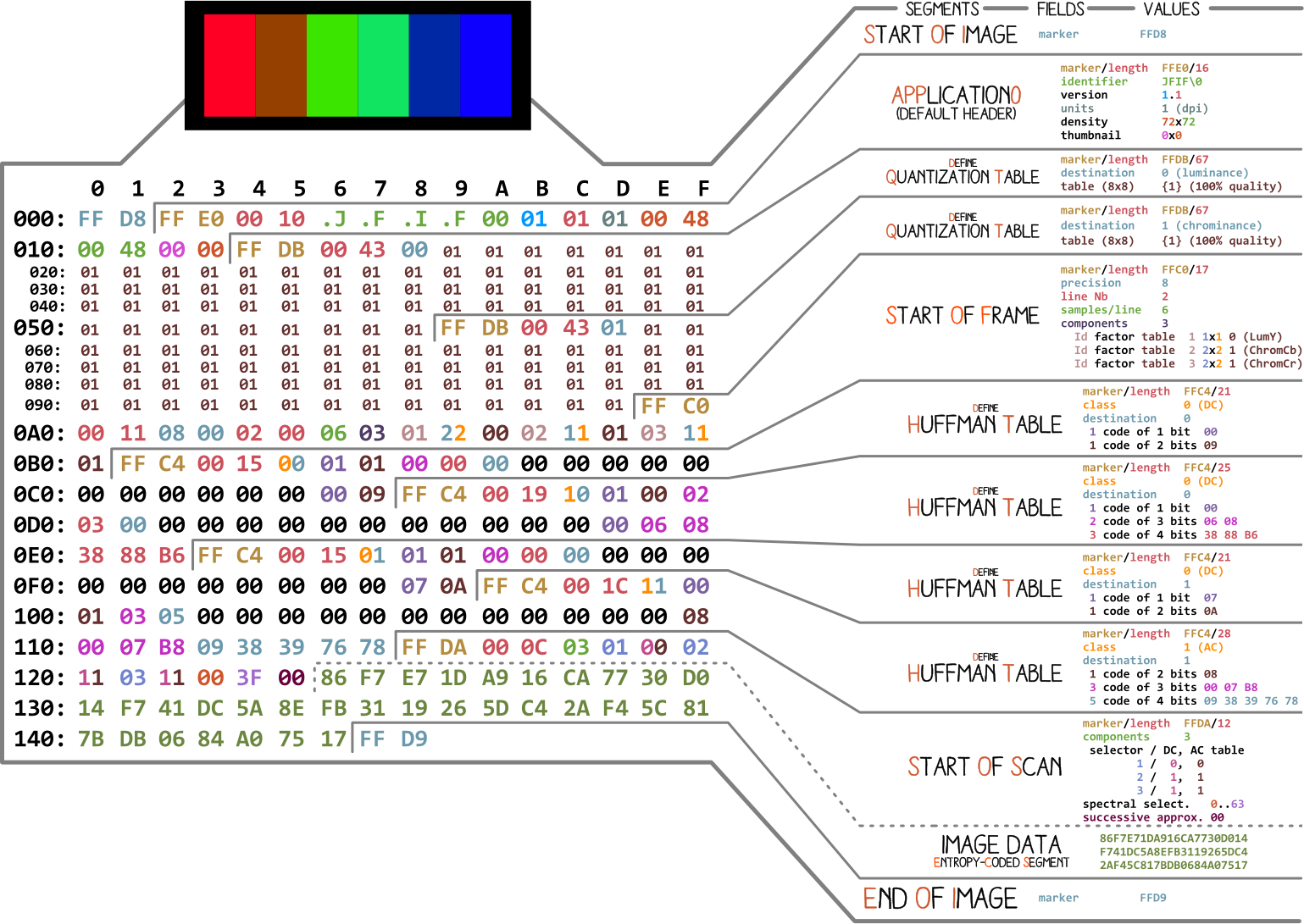
Thankfully charts like these exist, though, which makes me think that grabbing raw bytes in C, and performing a little bit of modification on them (or, with any luck, sorting them into a copied buffer) shouldn’t be too difficult (I hope).
Any tips? I just crossed over from assembly to C, so I figured this might make for a good first project. I’m also curious as to which of these tables can be safely fucked with, but I’m guessing that the first practical step is to manipulate pixels without ruining the image entirely.
I’m sure there are image processing libraries galore, too, but I love having a higher-than-average failure rate so that I can at least understand a little bit of what I’m doing before taking the easier route (otherwise, I’d just be using Python and Processing like always). Plus, the rewards are usually so much cooler - and if I can make things any bit speedier in the process, that sounds like a good investment upfront for more fun later
Are you able to link hexadecimal values to arrays of matrices? Or a matrix of arrays?
Or
Go in blind..
Like save an original unmodified copy…and keep it unaltered
Then save another instance where you go in blind and randomly fsu…by changing hexadecimal values…and just experiment.
I have no idea what that is but if it is a jpg file just start randomly changing stuff.
You can even do the same in notepad but I have no idea how to read ASCII or whatever the fuck it is encryption jargon.
Some of my glitch art…I just randomly changed shit in a hexeditor or notepad had rendered it in windows ms paint…saved as a jpg and photoshopped the image to my liking..
The obvious answer would be the “image data” section, but you may get more weirdness from messing with the compression and quantization tables. I’d leave everything else as is (start/end/header) just for ease of use so you don’t have to force things open and it’s not going to affect the image anyway.
In cases like this is really helps to have your head around what the format is doing (and you may already, so feel free to ignore). Just like a raw audio file is a number denoting a frequency for every single sample (so 44,100 numbers per sec or whatever), a raw image file is four numbers, RGBA, for every pixel in the image. That’s a lotta numbers and a big-ass file, so you compress it, which is what the quant and Huffman tables are about.
Quant defines the level of compression - ie how much data to throw away (like if you have a 255 255 255 0 value and a 255 254 254 0 value, just toss one and make them both the same). Messing with those numbers is like bitcrushing or the opposite, except there is no opposite because it already threw that data away, so usually the algorithm fills in with somethings like 00 (though you could make it a different value or random or whatever).
The Huffman tables are binary trees denoting how often a value shows up. If you have 35 pixels that are “really fucking red” or whatever value, it keeps track of when and where so you only need one “really fucking red” in your image data instead of 35. Changing those values is going to affect how often a specific color gets assigned to a pixel (which is probably where the big smearing or moray patterns would come from).
So you get a sort of complicated multiplication of how much (quant) * how often (Huffman) * value (image data) for each pixel and a program just walks that algorithmic tree and puts a colored dot on the screen.
If you’re interested in file formats in general, WAV is dumb simple and super easy to implement in C (or any language) and immediately playable so you can see the effect of your code. It’s a great way to get comfortable with things like reading the data in and looking for specific starting markers.
Sort of all 3, if I can somehow juggle it; being able to do raw editing (xxd has been awesome for this so far!), performing (even if very basic, for starters) low-level manipulation on the individual bits and also being able to continue to leverage high-level libraries and prototyping (the latter being my usual mode) would sort of allow for maybe a smooth transition into understanding small parts at a time, since there’s sort of a bunch of crazy juju going on in there.
Do / would you use linux? I could toss you a few DIY bash scripts for the hex dumps / recompilation if you ever get back into this. I’d love to see where you start plugging away because sometimes intuition can lead you down some fun rabbit holes!
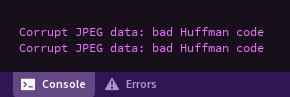
My problem so far with taking casual stabs is that while it looks like a JPG after the fact, my army of hands-off / library-centric environments get all pissed off at me:
This is awesome! So much of it is over my head for now, but thankfully I should be able to come back to your post periodically and understand a tiny bit more of it each time along my journey.
It seems like I might need some intermediate libraries to at least do the decoding before anything else; that was cocky of me to think I could just run some shitty bubble sort on a few values and get something interesting out of it; the encoding and decoding is something I’m certainly going to need to borrow some math for. With that said, there might be a sort of mixture of the two and a sweet spot to be found where modifying values doesn’t totally destroy these important segments, but instead adds something of value and allows for further manipulation.
.WAV might in fact be the better place to start, too, since I’m still kind of grappling with formats in general. I’m going to look into that, too, since I seem to have some awesome tools for making dumps and unintentionally destroying shit
I think I confused what you were trying to do. I was suggesting a process for editing the raw jpeg file, like you’d do in a hex editor - read the file contents into memory, edit the compressed data, spit it back out.
If you want to work with the decoded data, yeah, you want a library. It’d be crazy to have your first C project implementing a jpg decoder from scratch. Use something like libjpeg or stb_image.
I’d think you’d want to do something stupid simple like: malloc an array to hold the data, fopen/fgets the file into it, print out the first 100 values. That sounds really basic but even in that little bit there’s a lot of gotchas and really basic stuff that will be in literally any program you write.
Good call on that one - dynamically allocating memory is still very new to me, so this might be the best place to start. I got file copying and creation going (this is a lot less painful than asm, who would’ve thought?) but I still have a hell of a lot to learn.
The next trip-up will probably be figuring out how to continue allocating memory for said file (especially in the case of JPEGs) so that it doesn’t just clip somewhere, dump and save.
That’s the fun part - you can’t! At least not directly. C arrays aren’t resizable, but they are copyable, which means you make a new, bigger array (with hookers and blackjack), copy the old data into it and free the old array. There are proven strategies for this (like getting the current size and allocating 1.5x the amount on the new one), and plenty of libraries that implement it, but writing your own is a great way to dive into how it works. Then you package it up and #include "kvlt_memory.h" in everything so you only have to write it once.
Copying memory is really slow, at least in C terms, so part of the engineering is right-sizing your memory allocations from the get-go - like don’t allocate 100kb for a wav if you’re planning on processing an hour of audio, do the math and figure out a reasonable starting size. On the other hand, for learning and small-scale programs you can just grab a big chunk of memory from the start, do your thing and then free it if you don’t want to spend a lot of time playing with memory management.
But don’t dodge the memory stuff, lean into it. Even if it isn’t directly needed for what you’re doing, it is exactly what makes C special. When we say “low-level” what we mostly mean is “direct memory access and management”. What makes Python and Javascript and all the other high-level languages slow and shitty are the huge lumbering abstractions around memory - generic pointers, garbage collection, etc. It’s like writing 100 LoC to add any two possible numbers together in any way when what you actually want is 2+2…just do the thing you’re trying to do and don’t make a complicated abstraction out of what can be a simple operation.