The DSP Livecode / Prototyping Thread

TIL that GPIO and PIO are things and not that same. I knew that GPIO was General Purpose I/O and could be programmed to be used for basically whatever within the constraints of the processor, etc.

PIO is Programmable I/O that are basically their own little state machines that can run asynchronously and do their thing without eating up processor resources. Someone even used them to run a VGA display with a single RP2350/Pico 2. I’ve read a lot of times that 320x240 or maybe 480x320 are where most microcontrollers start to cap out on display capability. Adafruit’s Qualia platform dedicates a whole ass ESP32-S3 to running displays up to 800x480 and beyond (RGB666). That Pico probably had added PSRAM and so does the S3. But yeah.

https://www.raspberrypi.com/news/what-is-pio/


TIL I also learned Adafruit’s Ano Encoder is 32mm across. It rotates 24 detents, has a push button and buttons at the cardinal directions. You can even set it up to just query a chip on I2C, that chip remembers its location, etc. No faffing with reading all the time, and they even have a lil video of one of their circular Neopixel LED boards spinning around showing the positition and button presses. So good!

They have a NeoPixel LED ring THAT IS F%^$& 31.75mm inner diameter :upside_down_face:

Why are they like this. Yes that is such a tiny amount but I bet it’s enough to keep from spinning it easily or using the button switches at the cardinal points. Or maybe their diagram for the encoder is wrong and it’ll work fine. I guess I could email them…

Christ on a Cracker I hate Adafruit lol. Oh, CircuitPython is so easy, they said. It’ll be fun, they said.

Then gave absolutely minimal fucking guidance on how to address more than one Trellis board. Trellis being their I2C LED/button grids that you can connect up to 8. I finally figured out the gd syntax and got all the LEDs in my 8x16 grid to light up and do things.

When it was Arduino code/C they had a LOT more guidance and I had basically no issues. It felt like CircuitPython, which is THEIR THING, was an after-thought. I’m becoming more and more disillusioned with their “learn” system ¯_(ツ)_/¯

CircuitPython is pretty fast on iterating code, you hit save and it’s saved on the CIRCUITPY drive connected to your computer, and then it runs. Hope the flash holds up LOL :upside_down_face:

looked at the source code of the Trellis library, and they address the Trellis with a lookup table for LEDs and buttons. In hexadecimal. I SUSPECT this is the order the Fill command uses; every Trellis fills left to right, row by row, when I told it to fill all 128 LEDs. I guess I’ll have to test things once I figure out how to compile the mpy :eyes:

I have absolutely no idea wtf I am doing :smiley: but addressing the buttons/LEDs in a single 4x4 grid from left to right, then the next grid, is just confusing me. I want it so 0-15 are across the top row of the 4 Trellis boards, 16-31 the next row, etc
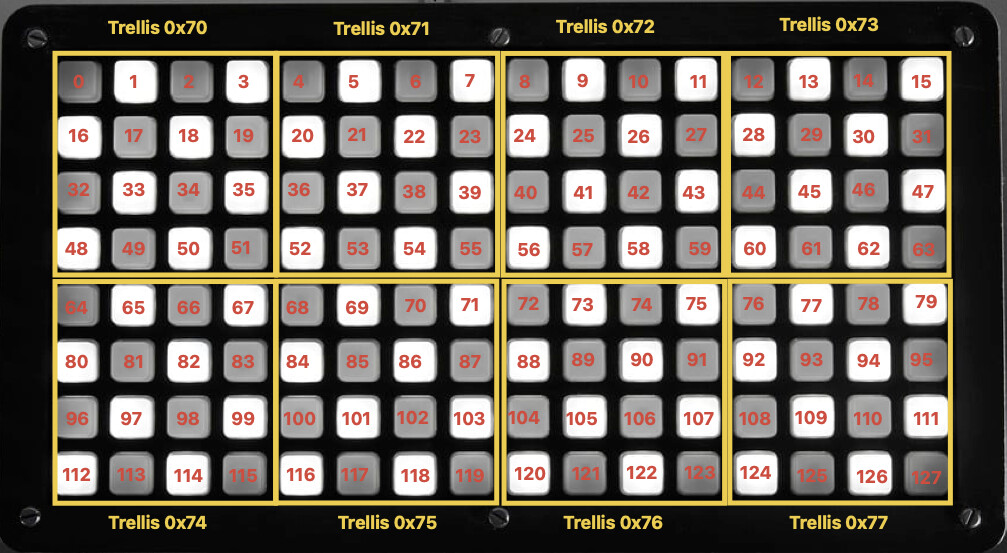
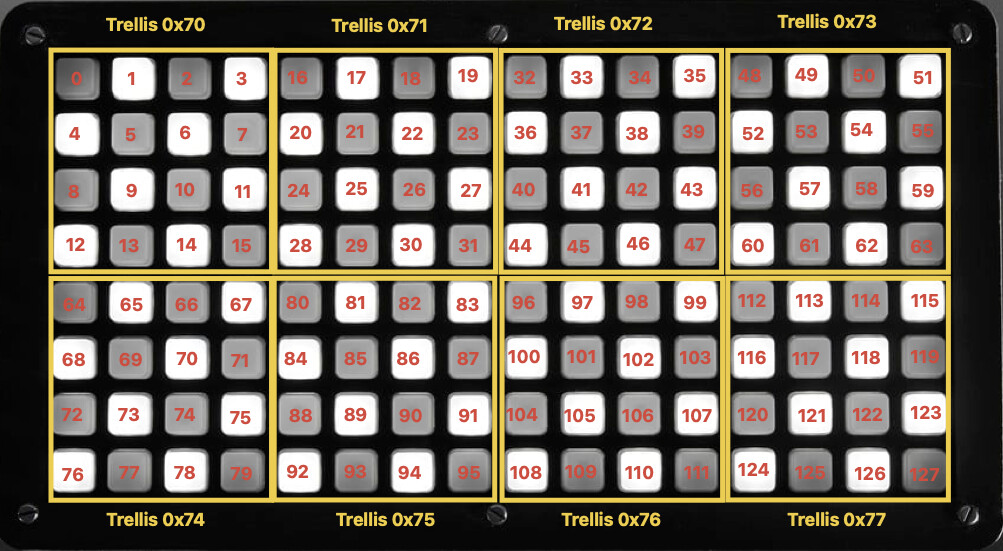
EDIT it occurs to me I probably can’t do what I’m thinking. Each board is addressed separately on I2C but there are only hex addresses for 16 things on the LUT. It makes sense I guess, they have a chip onboard that does all the fancy multiplexing and then they provide the library to address everything. I’ll have to make my OWN LUT to keep next to my code to reference which button/LED is which. REPL in the Mu IDE does spit out the button numbers 0-127 when you press it if there is code watching the buttons. so something knows lol.

That sounds kinda miserable lol. You’d think if Adafruit went to the trouble of making the hardware and the library they’d make it as configurable as possible.

I think you’re on the right track rebuilding the lookup. There’s no reason you can’t point “button #5” to device 2/[0x71], button 0 (ie top row, fifth button) instead of row 2, first button. I think where it gets funky is how they implement the polling or interrupts and what you’d need to change.

Is it possible to attack it from the other direction and just force the top row to send the messages you want? Like let CircuitPython code do whatever it wants as far as reading but code it so when you press the top row buttons you get 0-15 or whatever it is you’re going for? Surely it lets you change the CC values for individual buttons, right?

oh I can likely tell the code to use whatever CC per button I want to. I think their system is set up as it is because you can use just one 1 Trellis for a 4x4 16 button grid, so the addressing scheme starts based around that. I really don’t know a lot of coding beyond BASIC-style stuff :eyes:

LED Lookup Table

ledLUT = (
0x3A,
0x37,
0x35,
0x34,
0x28,
0x29,
0x23,
0x24,
0x16,
0x1B,
0x11,
0x10,
0x0E,
0x0D,
0x0C,
0x02,
)

Button Loookup Table

buttonLUT = (
0x07,
0x04,
0x02,
0x22,
0x05,
0x06,
0x00,
0x01,
0x03,
0x10,
0x30,
0x21,
0x13,
0x12,
0x11,
0x31,
)

so I think it’s the same for every Trellis; you’re addressing a Trellis first, then its button/LED

The Trellis.Fill code fills each Trellis one by one, left to right, top to bottom, before moving on to the next I2C address and fills it. When making the Trellis object I had to tell it the I2C address of every Trellis board. But somehow it still describes each button in decimal from 0-127

None of this is MIDI CC data, it’s just how the 4x2 8x16 grid is set up. I guess their library and the seesaw chips are smart enough to change the numbers per board. I do see some math in the library source code:

class TrellisLEDs:
def init(self, trellis_obj: “Trellis”) → None:
self._parent = trellis_obj

def __getitem__(self, x: int) -> bool:
    if 0 < x >= self._parent._num_leds:
        raise ValueError(("LED number must be between 0 -", self._parent._num_leds - 1))
    led = ledLUT[x % 16] >> 4
    mask = 1 << (ledLUT[x % 16] & 0x0F)
    return bool(
        (
            (
                self._parent._led_buffer[x // 16][(led * 2) + 1]
                | self._parent._led_buffer[x // 16][(led * 2) + 2] << 8
            )
            & mask
        )
        > 0
    )

On one hand, I have a handy dandy chart, but on the other hand I think I can do maths, weird, complicated maths, only once, to sort it how I want it. Maybe. I’m pretty far above my pay grade right now lol. It would also just break my heart if the buttons and LEDs shared the same addresses. There is some overlap but none of them line up or correspond to each other lol.

EDIT I’ve at least progressed to toggling LEDs vs them being on when pressed and off when released. I guess now I just need to figure out how to tell it to do something. Time to install the USB MIDI library

Okay, I think I’m maybe getting it and I think you’re on the right track. From what I can see you’re 100% on the way the hardware is set up and it jives with how I2C works in general - all same type devices work just like each other, they’re only differentiated by the hardware address (0x70, etc). That’s fundamental to how the I2C bus works, the ‘master’ controller sends out a command prepended by the device address which every device on the bus receives, but is only processed by the matching device with that address (which is why you can chain multiple devices). So it makes sense you have to have both, and that every 4x4 Trellis has the same lookup and whatnot.

Just glancing over the docs, it looks like there’s two separate things at work, the LED and the actual button. Those are two different commands/circuits, thus the two distinct lookup tables, so I assume you’ll be able to control them independently.

I’m not clear on what exactly you’re trying to do. Are you trying to do something with the LEDs specifically or a combo of LEDs and MIDI or what?

Right now I’m just trying to get my head around how everything works with the software talking to the hardware; how do I make it so I can interact with the buttons and LEDs for feedback. Unlike a Monome Grid I don’t even have PWM or really any sort of control over brightness levels even though there IS a Trellis.brightness that’s supposed to be an integer between 1-15. I can’t seem to make it work and I know when I was messing with the Arduino side they specifically said on or off are the only states.

I’m probably going to start with a step sequencer and then see if I can do a sequencer with different step lengths per track.

I’m also an idiot. I made that layout how I wanted it, not how it is LOL… oof Thankfully Apple’s FreeForm is really fast and easy. THIS is the correct button layout and I think shows it more clearly why I wanted to change it in the first place :upside_down_face:

Ah, I gotcha. I thought you were trying to change the library or debugging your code. You’re right, the docs for this thing is pretty limited. There’s like one example and almost no API documentation.

Because I’m a bit dense, I’m just now starting to get my head around the fact that this is not a MIDI controller, it’s a general purpose button thingy. So I guess you’ll have to set up all the MIDI/USB stuff, check for state changes, determine what LEDs are on, generate MIDI CC, all the things.

Were it me, I’d start with the Fill example just to make sure it works, then use the trellis.read_buttons method with some debug/serial output to figure out how the numbering and addressing works.

After that, assuming there’s no funny business with the API I think it’s just storing the pressed state in variables, reading the buttons, updating the state variables and doing something like turning on the LED and/or sending a MIDI message.

I’ve actually done all this :slight_smile: that’s the only thing their example CircuitPython code did lol. it lit all the LEDs at once, then lit them all in order across each Trellis, then sends button press and release messages to the serial monitor (called REPL in the Mu editor). All of the hardware works and I was honestly shocked. No LEDs backwards, they all light up, etc.

The Arduino sketch examples actually have a USB over MIDI example for a simple step sequencer. I have a short video of that running. Bitwig saw AdaFruit_Grand_Central as a MIDI device even.

Dunno why I decided to mess with CircuitPython vs C especially after it start putting up roadblocks immediately LOL. I guess it’s pretty easy to port code to any of the boards supported by CircuitPython, and both it and MicroPython are meant to run on microcontrollers. But then again most Arduino sketches would work for boards using the Arduino environment… It could come in handy if I decide to integrate with Ableton Live :woman_shrugging:t2: though I guess M4L could come in there, too.

I keep having to force myself to type out CircuitPython and not, well, the initials only lol

CircuitP? CPython? :upside_down_face:

Tbh I don’t see this being any “easier” or “faster” than coding in C, from my very limited experience. Other than immediately running code without compiling.

Arduino Sketch:

Var=5;
void loop() {
do stuff here
}

CircuitPython:

Var=5
While True:
do stuff here

Honestly the loop thing makes a little more sense to me, but I’m used to For, If, Then, etc from BASIC. CrctPy (there we go!) does have If and such, but yeah… I just need to pick one I guess. The sketches are compiled into assembly, so that will definitely be faster if you have one of the less powerful MCUs.

Right now, the current code.py file lights up each LED with a button press and prints press and release to the REPL. Pressing the lit button again turns it off. Their original example code was a momentary switch sort of action, turning the LED off on release so I did a thing. After this I guess it’s time to look at the Arduino sketch for the sequencer to try and figure out how to replicate what its doing somehow.

It sounds like you’re basically there if both the hardware is recognized and the code works. Well done!

Now you just need to link up the button press with MIDI messages, something like:

if (read_buttons != 0) {
    MIDI.sendNoteOn(42, 127, 1); // or whatever the API for your midi library uses
    MIDI.sendNoteOff(42, 0, 1);
}

You’ll probably want to create an array to update the state of each button in the loop so you can check on/off or whatever, checking if it’s changed. Maybe implement a lookup or offset for the note value depending on the button number pressed. It’d depend on what read_buttons returns as to how you structure it and what you want it to do. The world’s your MIDI oyster, you just gotta build it.

Me either lol. I greatly dislike Python and wish it would just go away. To be fair, I guess get it. It’s easy, mostly. The syntax is verbose and straightforward, has a shit ton of libraries, is flexible and portable, well documented, directly extensible with C and overall pretty forgiving for new programmers. But it’s an objectively poor language to do most things in. It’s slow, heavy, garbage collected, interpreted, dynamically typed and has a bunch of funky ‘pythonic’ bullshit that is just bitter syntactic sugar for zealots to argue about. It’s basically good as a general use PowerShell that works on any computer, fine for small, quick one-shots but has zero business being used for anything and everything, especially embedded programming. /rantoff

Directly to your point, most everything you’re doing with CircuitPython would probably be just as easy and run as fast or faster in C, or even just using the Arduino C-subset. Is there any Arduino or C code for the Trellis you can use or is the Circuit stuff the only option?

Every microcontroller in the world is running an endless while loop. It’s just how it works - you need something to tell it to keep going, otherwise it runs the code and stops. For that matter, any program you open on a computer that doesn’t do something and immediately close is running one too, with the added logic of if(keypress == escape) {close} or similar inside the while loop. Obviously you don’t want your refrigerator or whatever to quit, so for embedded it just keeps while-ing to infinity.

lol I just read about Arrays in both languages and I also looked at the HELLA Oonztrument (now Untztrument) ardiuno sketch which shows an array of buttons depending on if you are using the 2x2 or 4x2 version (4 Trellis vs 8 Trellis).

It was originally done on an Arduino Leonardo, and there is definitely more/better documentation on it. And I think C is definitely just going to be faster since it’s compiled vs interpreted. Back in high school one kid had a TI-82 and it was slow/laggy compared to my TI-85 running the same program. The 85 compiled before run, then 82 interpreted as it went. I’m kinda versed on that sort of difference at least XD

There are some things I liked better in CircuitPython examples, but more things I liked in C/Arduino. Making variables made better sense to me in CrctPy and was more what I was used to, but it’s not a huge issue. And I do have VS Code set up to do Arduino stuff through PIOArduino (previously PlatformIO). I even programmed the Adafruit Grand Central with it instead of CircuitPython the first time. I guess I was trying to use it since it was Adafruit + Adafruit and all their widgets have libraries in CrctPy

Except there is no Untztrument library, but there IS one for C/Arduino.

The more I think about it, the more I think that having a powerful MCU just to use Python as fast as C is like a weird kind of crutch. I made all their Leonardo code run on their Grand Central fine, not one single issue and it worked first time LOL. I think tonight I’ll try and recreate this Python code I have running right now.

The PlatformIO/PIOArduino stuff is actually really neat, too. You create a project and tell it what board and framework (Arduino, Espdif, etc), and it’ll download anything it needs for that specific board and you’re off to the races.


Somewhat related I am tired of all these microcontroller boards still using f’ing USB micro lol. LIVE IN THE NOW. I am not buying another without USB C.

Array’s are super fundamental and super handy. Basically a bucket of the same type of variable under a single header that you can easily access. So you make byte buttons[127], an array of type byte (since you just need to store a 0 or 1/on or off for a button) called “buttons” with 127 entries. Then if you want to read or write the 7th entry you call buttons[7] and you’re there. Arrays get used basically anytime you want to group like variables together for easy access.

To be clear, it really depends on a lot of factors. I don’t know what’s running the Trellis show. If it’s a RaspPi running Linux running Python code, it’s interpreted. If you’re uploading it to a SoC board like Arduino or ESP32, it’s probably transpiled from Python to C then compiled to binary so it’s going to be more similar to straight C than not. The catch is that not all compilers are made equal, and it’s entirely possible there are some missing optimizations having to jump from Python to C to binary. On balance, you’re not asking this thing to do cryptography, it can probably handle unoptimal code without a major performance hit. That said, I’d just use Arduino-C if it’s available.

Amen to that. My ESP32-S3s showed up and they’re fully USB-C. One less cable I have to hunt for. Unless I run into a show stopper working with them they’ll be my go-to dev board for the time being.

CircuitPython is Adafruit’s fork of MicroPython, which is a slimmed down Python meant to run more efficiently on microcontrollers. When I installed CircuitPython firmware there is a drive that shows up on the computer called CIRCUITPY. Using the Mu IDE you save code.py directly to this USB drive and then the code reboots and runs. There is no compile stage. The Grand Central is a 120MHz Arm M4 so it can probably do a lot even with CrctPy interpreting along the way.

I tried using my old Arduino Due that I have laying around and it just failed to compile with errors all kinds of errors. Same C libraries and header files. I’m not sure why because it worked when I sent the sketch to it from the project for the Grand Central lol. The Due is weird, though. It has a programmer USB and a normal USB and that port is blocked by the case XD

The Due sketch failed compile/load on the official IDE and the VS Code PIOArduino setup. I originally bought it to be a synthesizer as when it came out, it was basically the only Arduino with a DAC at the time, and well, I think I’m just going to let it be for now. Maybe I’ll use it someday…

Sadly MicroCenter is out of most ESP32 stuff but it really does seem like the best cost to performance out there.

Apparently there are a lot of boards that don’t support MIDI over USB. Not the Arduino Uno R4 even. The MIDIUSB library was made for the Leonardo, the Due, and similar SAMD boards. I guess I’ll try to re-flash the Grand Central from CrctPy back to being able to run Arduino sketches. It ran flawlessly. God damned micro USB lol… because it’s from like 2017 or 2019 at best.

The error
packages/framework-arduino-sam/variants/arduino_due_x/variant.h:67:56: error: cannot convert ‘RoReg* {aka volatile long unsigned int*}’ to ‘volatile uint8_t* {aka volatile unsigned char*}’ in assignment

This is definitely above my pay grade. It DID, however, compile to a Leonardo, and is working as expected. So much for the BBC (Big Blue C-board lol, Due is a Mega-sized board).

I meant to link this here earlier, found it when researching DIY controllers. The Control Surface docs are ending up invaluable - they’ve done a lot of the low level work and have great explanations, documentation and examples. This is specifically a list of boards that support MIDI over USB. It looks to be pretty up-to-date.

LOL I was just about to link that, too :smiley:

I ended up with an Adafruit Metro ESP32-S2 - the biggest difference between the S2 and S3 is single vs dual core which I’m fine with for this. It kinda galled me since it’s about the same price as the S3 that Microcenter is out of stock of, but it has USB C at least. I’m just so over micro even if the Leonardo is doing the thing fine. I could have saved a few bucks, but I try to support local when I can and I don’t like the idea of MicroCenter going the way of Fry’s

Metro = Uno-sized
Grand Central = Mega-sized

EDIT And the ESP32-S2 isn’t working. I’m so done with this lol (I’m pretty sure what’s going on now is code expecting calls from the MIDIUSB library and I need to convert/adapt the code to use the calls from some other libraries I found. Bummer. The M4 platform worked without a hitch)

I think it’s time to slow down for a bit and recollect myself before trying to throw things at the wall to see what sticks

EDIT2 yep, all this faffing about with microcontrollers in the Untztrument case has messed up the connection to the 2 Trellis boards on the right :upside_down_face: I think I’m going to take that as a cue to pause for a bit

I get that. Fine line between pushing through a problem and getting so frustrated that things just compound. Stepping away seems like a good call since this is ostensibly just for fun anyway.


Early report on the ESP32-S3. It’s good, with some annoying caveats. The first is that the built-in LED is staring-at-the-sun bright, and comes blinking out of the box. Great to know it’s working, annoying after about five seconds. This is a no-name knockoff board so no idea if the actual Espressif boards are like this. You can turn off the main offender in code.

Second is the board is wide, the width almost feels like a troll - it’s exactly one row short of a standard breadboard, meaning if you can jumper wires on one side or the other, but not both, thus blocking a whole bunch of GPIO. And it’s just a hair too wide to straddle two breadboards. My solution is to solder headers and use male-female Duponts to connect it to a board and go from there. Another option I’ve seen online is cutting a board in half to get the extra space, but not sure I want to go that far.

Upsides, Arduino IDE picks it right up as an S3 (just need to grab the ESP32 board definitions) and USB-OTG is as easy as setting a checkbox in the IDE. Dual USB-C, one for programming, one for actual USB. And they’re dirt cheap for the power.

After a couple of false starts with some settings I got it recognized as a MIDI device without much hassle using both Control Surface and a ESP32 USBMIDI library from github. Now to start wiring things up…

I don’t know if it’s 100% related to any issues here, but Circuitpython and Arduino libraries are always spotty as hell, especially when you happen to be using something slightly different from what it expects, some new version of a board it wasn’t specifically updated for, or something (often totally undocumented) like that.

I’m at that point with most embedded devices where I’m either going all in on bare metal ASM / C or just shelving projects that are too complex for libraries to really cover and work together nicely for. Micro / Circuitpython seems really nice and easy until it starts to unravel, which is often sooner than later.

1 Like

oof. The cheapy ESP32 WROOM-32E I got from Microcenter has just enough room for one row on either side of a breadboard. I plan to get some without headers soldered on so I can put some female headers on top of it like Arduino and similar prototyping boards. Apparently desoldering pre-soldered headers can be troublesome.

I’ve noticed Adafruit using these mux chips in multple products: HT16K33 - it’s in the Trellis, they use it on quad alphanumeric LED displays that normally take 18 pins to run. 14 segments vs 7 segments. Braids uses a display like this. They plug into an Adafruit Feather but it’s just I2C to control them. Sonicware actually gets a lot of mileage out of a 4 character 7 segment display.

I tried again and no matter what libraries I have installed/#included I get an error of missing midi_cable.h and searching the internet is useless. it just says the person is missing X library and that person says “great! thanks!” and it still doesn’t work on my end.

I even found midi_cable.h in the library folder but it’s in the example folder. I did not have this problem with the Leonardo using USBMIDI, but the ESP32-S2 with USBMIDI ESP32 does have it. I’ll revisit later, for now I’m going to focus on reading pots and sending those signals to an Axoloti or something lol.

yeah Adafruit’s OG Trellis board is pretty old, they’ve moved on to the RGB Neo Trellis boards and haven’t updated the original since 2013 or something. It did all “just work” when I used an Adafruit M4 board, though. Adafruit’s “thing” is supposed to be documentation/libraries for all the things they sell XD

EDIT Me when I’m designing things to 3D print:

1 Like

Found the SPI interface on the Axoloti which is great since my cheapy OLEDs are SPI and not I2C. I’ve modified the faceplate of this 15 knob Axoloti box to include a slot for the screen (replacing a knob). I’ll add an encoder, too, for practice I guess.

Of course there is no Axoloti object to actually use the SPI interface for some reason. Well I just found a module that has several possible pinouts, so maybe that one.

Bestest thread ever. :100::100::100::100:

1 Like